
When the player first loads into the game, Kauri awakes to an NPC who saved them and explains to the player what Kauri’s goal is (Obtaining their lost fish hook). To do this, I have to create an interactive dialogue system.
As explained in the following post, the dialogue system will be heavily inspired by Nine Sols’ dialogue:
Creating a Dialogue script
Before I created the dialogue script, I needed to know what the dialogue script needed to do:
- Show dialogue lines to the player
- Be able to edit dialogue lines in the inspector (For ease of use)
- Be able to enable the next line of dialogue
- Disable the current line of dialogue when the next one is loaded
Showing dialogue to the player
To show the dialogue to the player, I needed a reference to a TMP (TextMeshPro) text component:

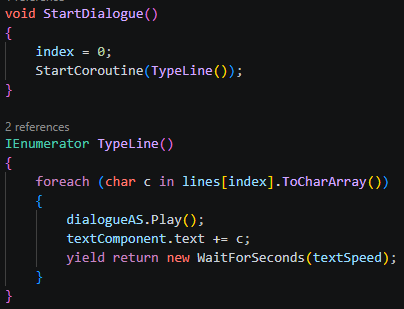
And then reveal the lines of dialogue to the player:
Editing dialogue lines in the inspector
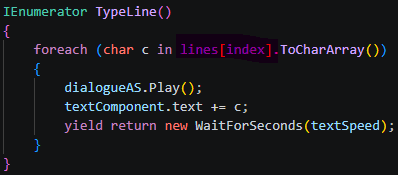
Creating a reference to an array of public strings, stores lines of text in the script as “lines”:

Which is then used in the TypeLine() coroutine and revealed via the referenced TMP component:
Enabling the next line of dialogue
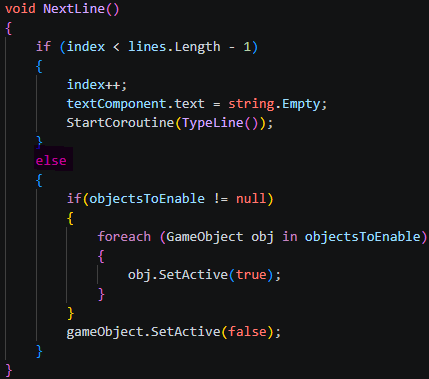
This pulblic array of gameobjects allow me to assign gameobjects to it in the inspector:

Then, if there are no more lines of dialogue to display, the gameobjects in objectsToEnable are enabled (Which will be a gameobjects containing the Dialogue script of the next speaker).
Disabling the current gameobject’s dialogue
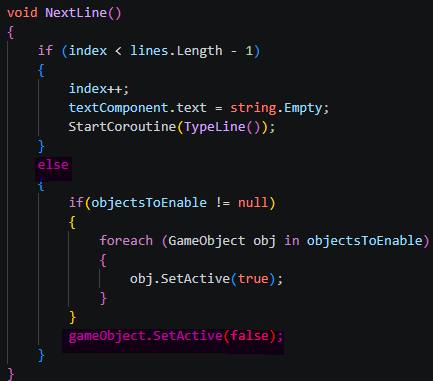
Similar to the previous functionality, after there are no more lines of dialogue to show – and all the gameobjects in the objectsToEnable array are enabled. THe current gameobjet is set to inactive:
A bit of polish
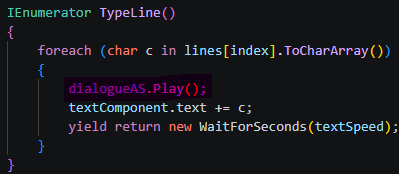
Often used in RPG games, notably Undertale, sounds are played when a new character is revealed during the dialogue. To do this I created a public audio source reference in the script, and assigned an audio source from the hierarchy:

Slightly more polish
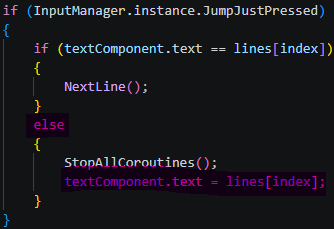
Some players might not want to sit through waiting for each character to appear one by one, especially during lines of dialogue that are particularly long. So, I added a functionality that if the player were to press the continue input before the dialogue had entirely appeared, it would just finish the line of dialogue completely:
Dialogue prototype
The sound used in the prototype was created on this website.
Leave a Reply