After completing the early tests for the Dialogue Manager, I continued to prototype the Reputation Manager. The goal of this system was to record changes in the relationship between Tyler and the main NPCs, so the player’s choices in dialogue or quests could leave a persistent impact. Compared with a single dialogue branch, reputation works more like a long-term state: it should record what the player has done in the past, and later affect NPC attitudes, dialogue content, quest states, area unlocks, or endings.
I made the Reputation Manager using a simple NPC enum to distinguish Marcus and Sierra. Each character had an independent affection value, and the value was clamped within a fixed range. This was to prevent the reputation value from increasing or decreasing infinitely, and also to make it easier to judge NPC attitude changes through different value ranges later. For example, a higher reputation could represent trust, while a lower reputation could represent suspicion or hostility.
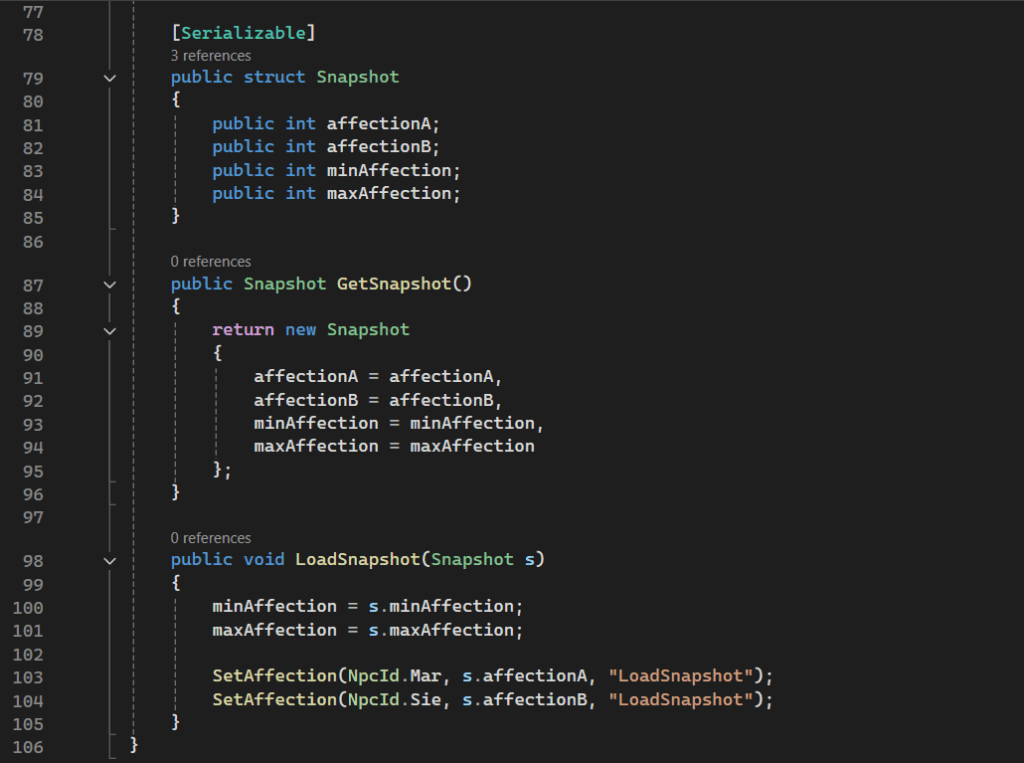
The manager provided several basic functions: getting the current affection value of an NPC, directly setting affection, increasing or decreasing affection based on the current value, and triggering an event when the value changed. To make the system more stable, I also added a Singleton so other scripts could access it through ReputationManager.Instance. At the same time, I used DontDestroyOnLoad so this manager would not be destroyed when switching scenes, because reputation should essentially exist as a persistent game state.
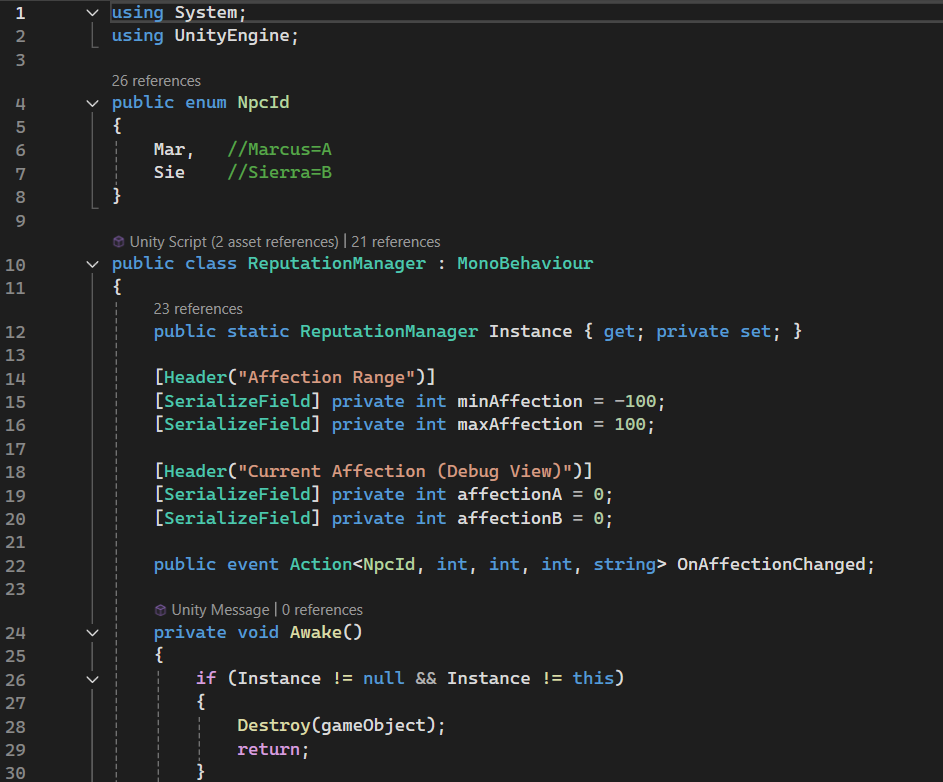
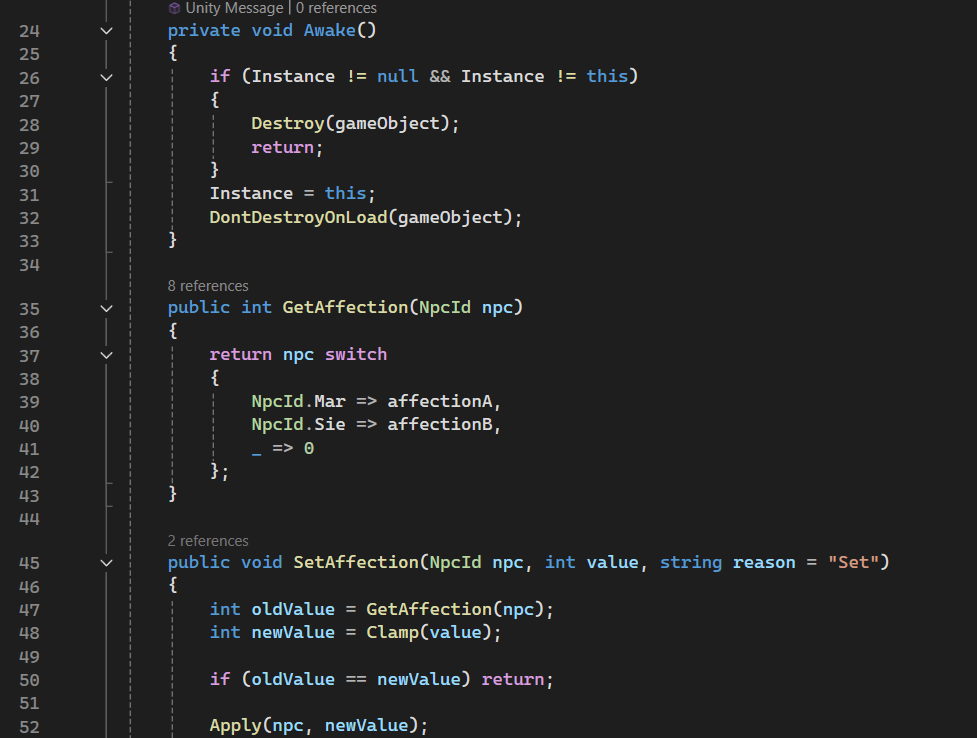
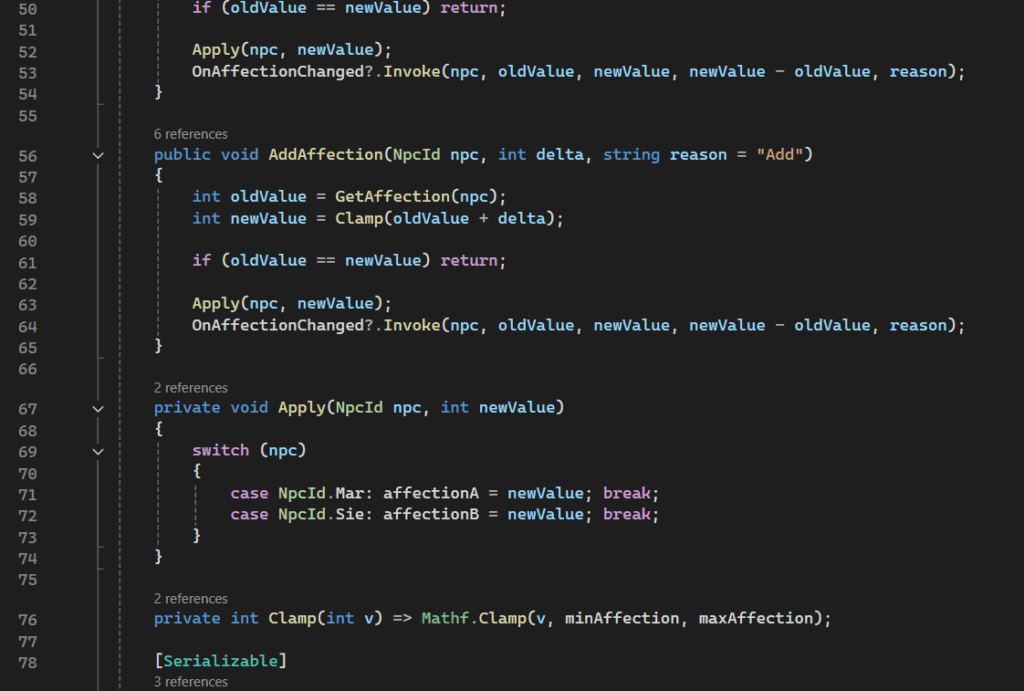
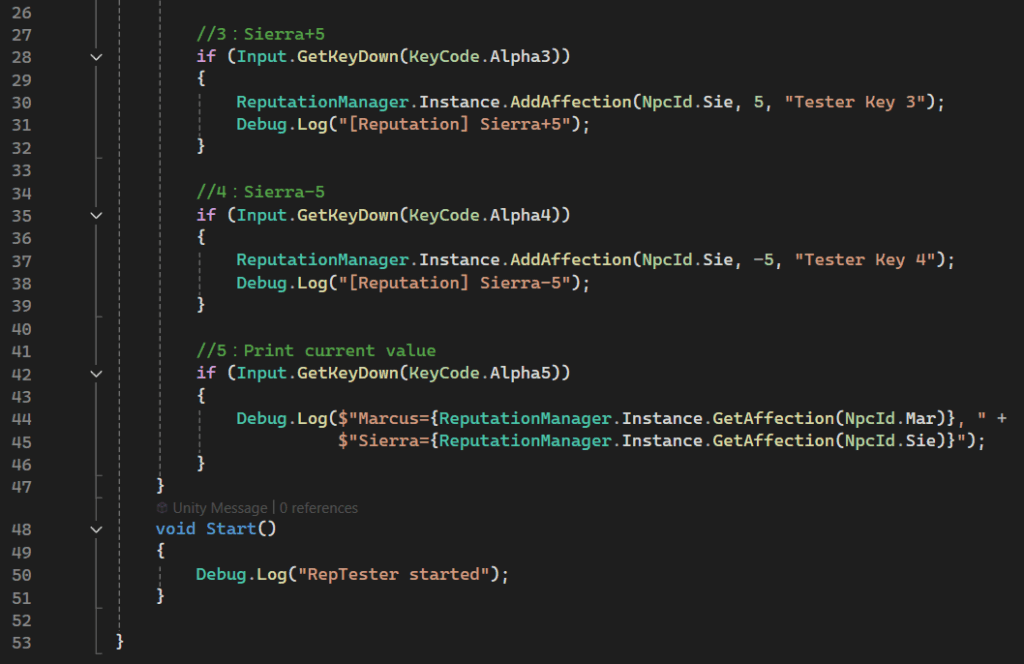
To test this system, I also wrote a separate script called RepTester. It allowed me to directly change Marcus or Sierra’s reputation in Play Mode through keyboard inputs. For example, pressing 1 would increase Marcus’s reputation by 5, while pressing 2 would decrease Marcus’s reputation by 5. Pressing 3 and 4 would test Sierra’s increase and decrease in the same way. When pressing 5, the system would print the current values of Marcus and Sierra in the Console. This testing script helped me confirm that the basic increase and decrease logic of the Reputation Manager was working.
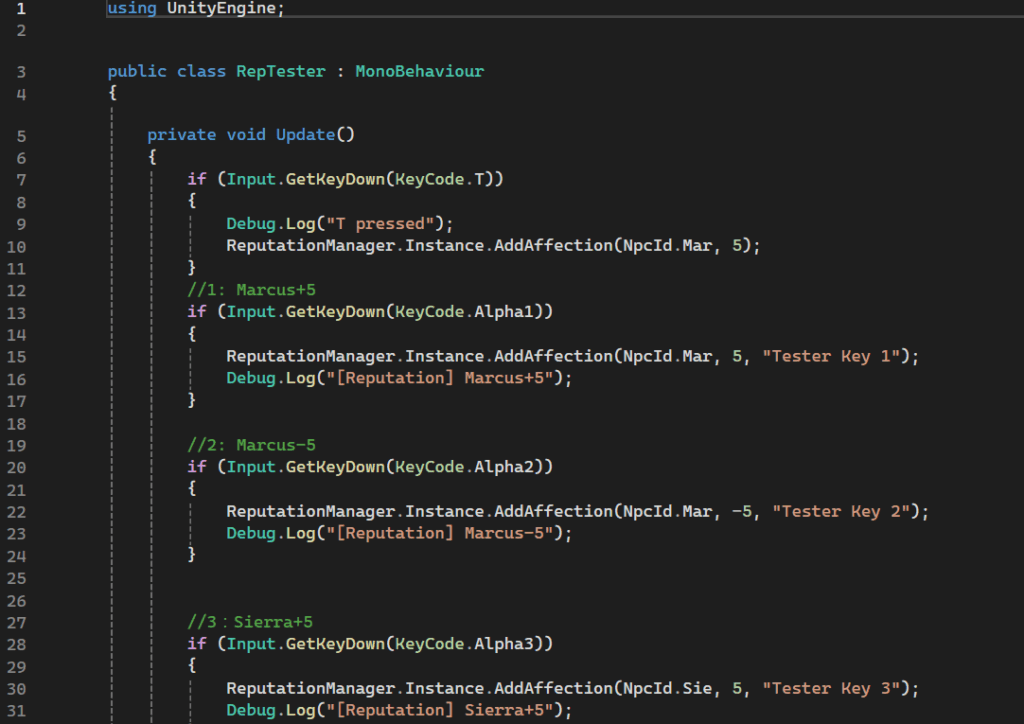
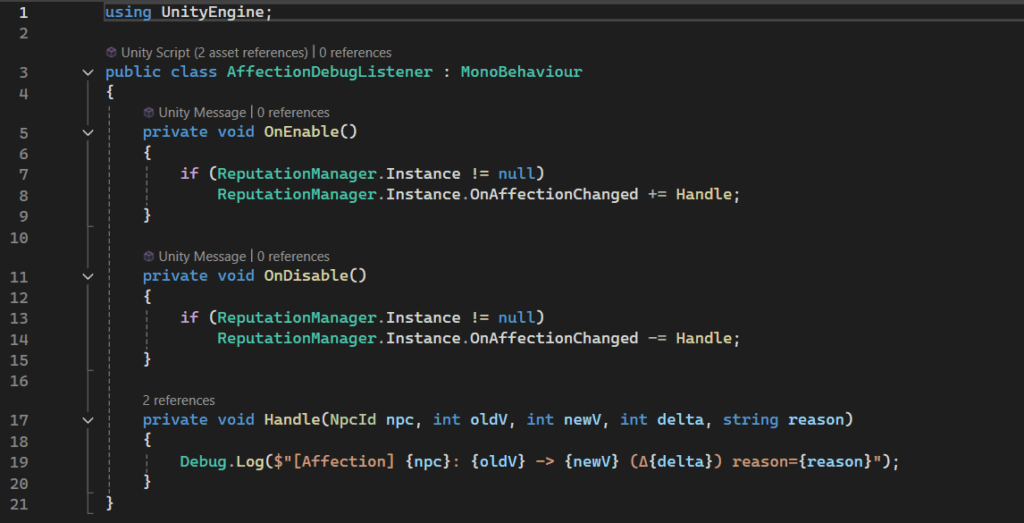
I also wrote an AffectionDebugListener to listen for reputation value changes. Whenever affection changed, it would display the NPC, old value, new value, amount of change, and reason for the change in the Console. Although this script was very simple, it was important for testing, because it allowed me to clearly see whether the system had actually changed, instead of only relying on values in the Inspector.
At this stage, what I had completed was the backend prototype of the reputation system. It could record independent values for different NPCs, clamp values within a range, change values through a testing script, and output debug information through events. This showed that, as a backend manager, its basic structure was functional.
However, this system was not fully used in the final Vertical Slice. The main issue was not the value calculation itself, but that it had not been properly connected to a gameplay loop that the player could experience. The Reputation Manager itself could only record numbers, but players would not feel the existence of the mechanic just because a background value had changed. It needed to connect with the Dialogue Manager, Ink choices, story flags, inventory, quest states, and UI feedback before it could truly become a game mechanic.
My biggest issue at the time was that I did not complete the loop of “choice → reputation change → visible consequence” early enough. Although RepTester could prove that the value system worked, it was only a developer testing tool, not a player experience. Players need to make a choice in dialogue, and then see a change in NPC attitude, available options, quest progression, or ending conditions. Without this visible result, reputation is only a hidden background variable.
Later, the Technical Designer created a more suitable connection method in the production version of the Dialogue Manager through Ink tags. The rep: tag in Ink could trigger reputation changes in Unity, and the Dialogue Manager could also push the current reputation values of Sierra and Marcus into Ink when a dialogue started. This implementation made me realise that what the Reputation Manager really needed was not a more complex value system, but a clear system interface.
If I were to rebuild this feature, I would start with a minimum playable loop: one NPC, one Ink dialogue, one choice, one reputation change, and one immediately visible piece of feedback. For example, after the player chooses to help Sierra, the system would increase Sierra’s reputation, and her tone would change in the next line of dialogue or the next time the player meets her. This would directly test whether reputation actually affects the player experience, instead of first building an oversized long-term relationship system.
Although this attempt did not fully enter the final version, it helped me understand an important issue: a Mechanics Designer cannot only design backend rules, but also needs to design how players perceive those rules. Whether a system works does not only depend on whether the code runs. It also depends on whether players can understand, through feedback, that their choices have created consequences.
Early Prototype Iteration:
Before I built the later Reputation Manager prototype, I had an earlier test script called RepTesterVer1. This version was much simpler: it only used keyboard inputs to add or subtract affection values from two abstract NPC IDs, A and B, and print the current values in the Console.
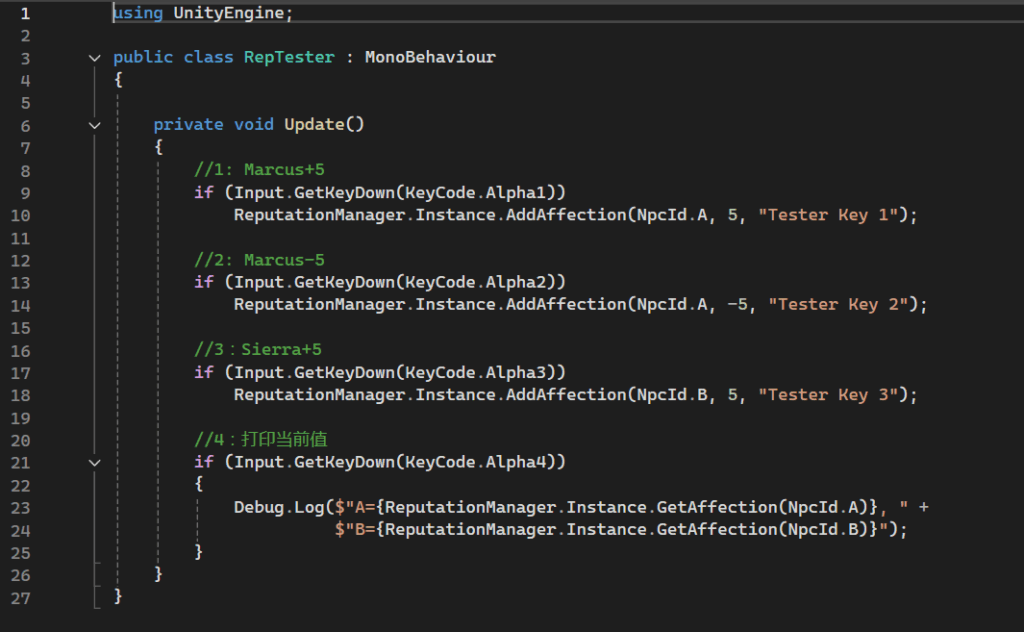
Although this version was very basic, it was useful as a first test because it helped me check whether the reputation values could be changed and read during Play Mode. At this stage, the system was still abstract and not yet connected to the actual characters in the project.
In the later version, I changed the NPC IDs from A/B into project-specific IDs for Marcus and Sierra. I also separated the system into a more complete Reputation Manager, added value limits, event callbacks, debug listeners, and snapshot functions. This made the system closer to a reusable game-state manager rather than a simple keyboard test.
Resource:
D3kryption (n.d.) Building Relationship-Based Systems and Controlling NPC Interactions. YouTube. Available at: https://www.youtube.com/watch?v=T-pf_KmFLfk.
Leave a Reply