The Fun
The “fun” aspect in my game could be seen through exploding hoards of cult member, each trap is able to one shot enemies and kill them in slightly gruesome ways like stabbing, eating and exploding on impact. The player also being able to shoot slimy boulders at the enemies and the animations in my game would add to the atmosphere of it being fun to play.
Planed for inspiration from Barley from Brawl Stars character attack however plan to make it less chaotic in my game:
The prototype I made showcases, the “fun” and aesthetically unique visuals of my game, the bright neo colours contrasting with the dark background draw my eyes towards the purple sunset and allows the character to stand-out from the rest of the 3D space, also the lighting was made through a 3D space which I believe creates realistic shadows and lighting which stands-out from the typical 2D pixilated games.
User Experience (UX)
- The Mechanics: Blood-Slime Harvesting: Collect blood from fallen enemies (RTS resource management).
- Defensive Trio: Deployment of Rangers (ranged), Melee (melee damage), and Human Shields (blockers).
- Catapult Ability: A manual projectile shot above the fence that costs blood resource, allowing for direct player intervention.
- The Experience: Nostalgic but intense. The quick arcade gameplay reminds me of Pac-man and original Donkey Kong where timing and skills is essential, with a bit of luck, game music (synth-heavy Ableton tracks) drives the pace of the mood and pace of the waves.
- Win/Fail State: Win: Successfully massacre the cultists across ~13 waves.
- Fail: The gate is destroyed and the town is breached. In my game the player cannot be damaged.
Interface of my game
Similar colour to the one seen in Hotline’s Miami 2: Wrong Number & Killer Frequency
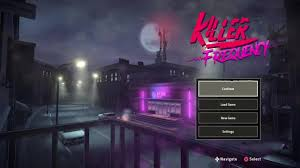
I want it to convey the similar visuals to my game. The menu could have:
Continue
New Game
Settings: inside the settings menu: brightness options, controls, sound level and Plug Ins (Steam’s controller support which also includes support for Xbox Adaptive Controller and PlayStation Access Controller). Simple button inputs, allow for inclusive player base.
PS Controls:
Triangle- tap opens the Defence Placement Menu, to navigate between them use the R-stick
O- acts like the back button, to leave the Defence Placement Menu and menu.
X button – Hold to sprint. Used to interact with the menus and starting the game.
Square- placing down defences, interact with gate lever to start the round.
Options- pauses the game and navigate back to the main menu.
L2- aims with the Casting Boulder / Catapult ability with Right stick to choose where it would land
R2- shoots it
Movement Left Stick / D-pad
Keyboard controls:
WSAD-movement of player and navigates around the home and Esc menu
Space – pulls down the gate lever and begins the round, press to interact with settings and menus
T- tap opens the Defence Placement Menu, to navigate between them use the arrow keys and E to place them
Shift – Sprint
Right click – aims with the Casting Boulder / Catapult ability with moving of the mouse to choose where it would land
Left click – to shoot it
Automatically Autosaves if possible
Leave a Reply