In the early version of the Dialogue Manager, I tried to add character portraits to the dialogue system. The original purpose was not simply to make the UI look more complete. Instead, I wanted players to understand more clearly who they were talking to, and when it was their turn to respond. For a project like The Verdant Trail, which relies on NPC interaction and character relationships, character portraits are also part of dialogue readability.
I originally wanted to create a more standard form of speaker feedback: whoever is speaking, their portrait lights up; whoever is not speaking becomes darker. This design would help players quickly recognise whether the current line belongs to Tyler, Sierra, or Marcus. It would also make the dialogue interface closer to the reading logic of a visual novel or narrative adventure game.
However, in my version at that time, the Ink dialogue had not yet used player tags or speaker tags in a stable way, so the Dialogue Manager could not reliably identify who was speaking in the current line. At the same time, the playtest was scheduled for the next day, so I wanted to implement some kind of visual feedback before the test to show “whose turn it is” as quickly as possible.
Because of this, I used a very simple temporary logic: when Ink choices appeared, the player-side portrait would light up; when the choices disappeared and the dialogue continued, the NPC-side portrait would light up. This logic was not suitable as a long-term system, because it was not identifying the speaker through real speaker tags. Instead, it was guessing the current interaction state based on whether choices were currently visible. However, for this Vertical Slice, this method was workable. The test scene only had conversations between the player and a single NPC, and the player portrait had not been properly placed into the interface yet, so this workaround would not be too obvious during testing.
Although this implementation was quite rough, it helped me solve a specific problem within a limited time: giving the dialogue interface basic state feedback before the playtest. When players saw choices appear, they could naturally understand that it was their turn to respond. When the dialogue progressed as normal text, the interface felt more like the NPC was speaking. This temporary solution did not solve the full speaker identification problem, but it provided clear enough feedback within the testing scope at that time.
Later, the Technical Designer added a more complete speaker and portrait logic in the production version. The system could use Ink tags to identify the current speaker, such as NPC, player, or narration, and adjust the brightness of the left and right portraits based on the current speaker. It could also switch between different characters and different emotional portrait states through speaker tags or specific portrait tags. Compared with my temporary solution, this version was more stable and more suitable for multiple characters, multiple NPCs, and more complex dialogue structures.
This experience made me realise that a temporary implementation is not necessarily a failure. For a Vertical Slice, sometimes the more important thing is to clearly understand what the current test needs to validate. If the goal is to help players understand the dialogue state during a playtest, then a simple but stable workaround can be more valuable than a complex system that is not finished yet. However, this kind of temporary logic still needs to be clearly marked in the documentation, because it depends on very specific scene conditions: a single NPC, no complex speaker tags, and no multiple characters speaking in the same conversation.
If I were to redesign this feature, I would define speaker tags in the Ink files much earlier, such as speaker:tyler, speaker:sierra, and speaker:marcus. This would allow the Dialogue Manager to identify the current speaker directly through tags, instead of guessing the current state based on whether choices are visible. This experience also helped me understand that UI feedback and narrative structure need to be designed together. If the text file does not provide clear speaker information, it becomes very difficult for the Unity side to create stable character feedback.
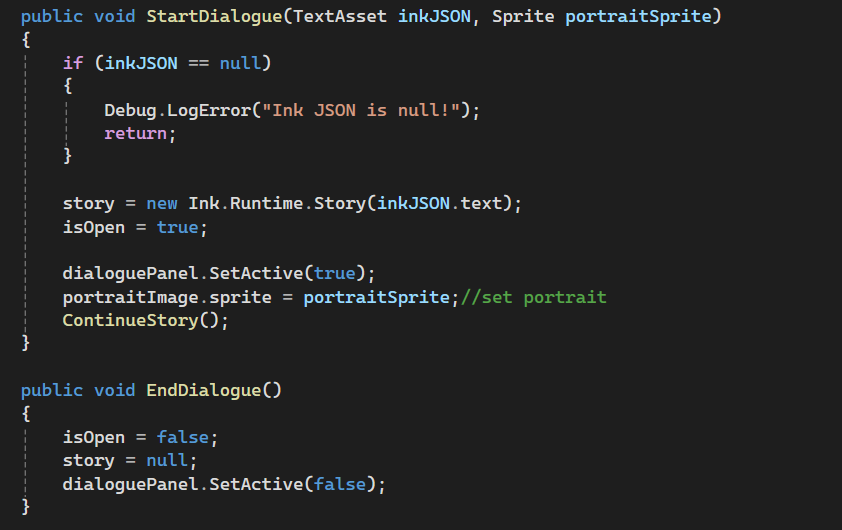
This screenshot shows one of the early test versions of my Dialogue Manager. Because I created several backup versions during development, and some intermediate versions were not preserved, this screenshot does not show every iteration of the portrait feedback logic. Instead, I use it as evidence of the early stage where I started testing character portraits in the dialogue UI.
At this point, the system could display an NPC portrait by passing a portrait sprite into the dialogue function, but it did not yet have a stable speaker-tag system. Some later temporary logic, such as using the appearance of choices to approximate when the player was responding, was part of the experimentation process, but is not fully represented in this saved version.
Postscript:
Later in production, our Technical Designer implemented the proper version of this feature through player / speaker tags in Ink. Instead of relying on my temporary choice-based workaround, the Dialogue Manager could now read the current speaker from the Ink tag and highlight the correct portrait automatically.
This solved the original problem much more cleanly: when Tyler speaks, the player portrait lights up; when Sierra or Marcus speaks, the NPC portrait lights up. It also made the system scalable for more complex conversations, because the UI no longer had to guess the speaking state based on whether choices were visible.
This was a useful comparison for me. My workaround was enough for an early playtest, but the tag-based version showed what the system actually needed for production: clear speaker data from Ink, and a UI layer that responds directly to that data.
Resources:
Brackeys (2017) How to make a Dialogue System in Unity. YouTube. Available at: https://www.youtube.com/watch?v=_nRzoTzeyxU.
Cox, D. (2019) ‘Unity + Ink: Part 4: Tags and Rich Text’, Digital Ephemera, 10 July. Available at: https://videlais.com/2019/07/10/unity-ink-part-4-tags-and-rich-text/.
Harper, K. (2023) ‘The Art to Programming Conversation’, Game Developer, 4 December. Available at: https://www.gamedeveloper.com/design/the-art-to-programming-conversation.
黑羽菌-Unity (2023) 15 分钟学会 Ink(视频游戏对话语言)- Ink教程. Bilibili. Available at: https://www.bilibili.com/video/BV1zx4y1u7sE/.
墨绿_InkGreen (2023) 【墨绿游戏教程2】把 ink 文件导入 Unity! Bilibili. Available at: https://www.bilibili.com/video/BV1nj411X7vU/.
Leave a Reply