This week I did a very small Wwise test in Unity, just to make sure the basic pipeline works.
The goal was simple: trigger a Wwise event from a script and confirm that it plays correctly on a game object in the scene. At first I used `AkUnitySoundEngine.PostEvent(“Play_Dust02”, gameObject);`, where the first parameter is the event name and the second parameter is the game object that the sound should be attached to.
After that I switched to using a serialized “AK.Wwise.Event” instead
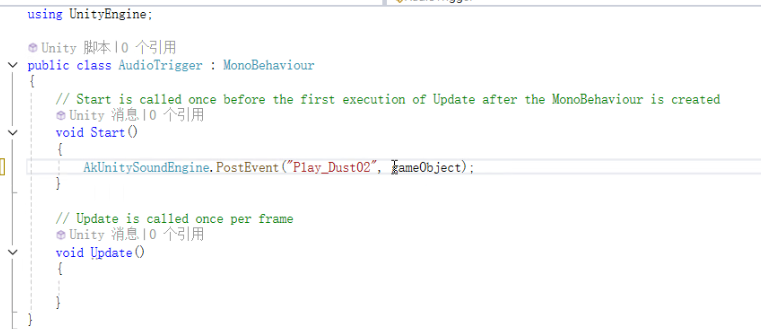
The first parameter: events
The second parameter: the name of the actor

This week I did a very small Wwise test in Unity, just to make sure the basic pipeline works.
This version is easier to manage, because I can assign different events directly from the Inspector without changing the code. It also makes it clearer that the event is tied to this object in the scene.
Even though this is a very basic test, it helped me understand how Wwise events, soundbanks and Unity scripts connect to each other. The next step will be to move this code from `Start()` into actual gameplay triggers (for example, collision/trigger volumes or interaction points), so that SFX can respond to player actions instead of just playing automatically when the scene loads.
At first I followed some video tutorials for the Wwise–Unity workflow, but because the versions were quite different from my current setup, a lot of steps didn’t match. Recently I switched to the official Wwise documentation and example projects, which is slower to read but more reliable.
Based on my previous experience with Pro Tools and recording practice, I did some very simple asset work: recording UI sounds and editing footstep loops. One challenge was making the footsteps loop without audible seams, since this is my first time working on a non-linear audio project rather than a fixed timeline.
On the implementation side, I ran into several problems. At one point Unity could not detect or load the SoundBank I had generated from Wwise, so I need to investigate my SoundBank settings and paths further. I also had a confusing bug where my UI click sound was somehow being replaced by the footstep sound. After some trial and error I realised this was likely caused by the way I assigned events in Unity (the wrong event being referenced or reused), so I still need to clean up my event setup and naming conventions.
Overall, progress with Wwise is slower than I expected, but these small experiments are helping me understand how recording, editing and implementation all connect together. My next step is to solve the SoundBank loading issue and then move these tests from simple Start() triggers to real gameplay interactions.
Leave a Reply