Today, when I was adding corresponding audio for the player opening and closing the backpack, I found a problem. I had clearly packaged the SoundBank normally, and the script reference was also correct, but for some reason the sound just would not play properly. The console also kept showing that the SoundBank had not been loaded.

But the other sound effects in this SoundBank were all playing normally.
(Theoretically, I should not split SoundBanks like this, but as shown earlier, I misunderstood the meaning of SoundBank, and I am worried that changing it now might cause bugs, so I can only continue with the current setup.)
I tried regenerating the SoundBank, but nothing changed. However, I quickly noticed one thing:
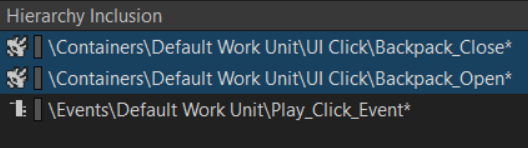
In Wwise, inside this SoundBank, the paths of these two kinds of sound effects were different. One was audio, and the other was event. I tried changing the audio to the corresponding event, and then it worked properly.
To be honest, this startled me a bit, because in my amb SoundBank, almost everything was directly added as audio.
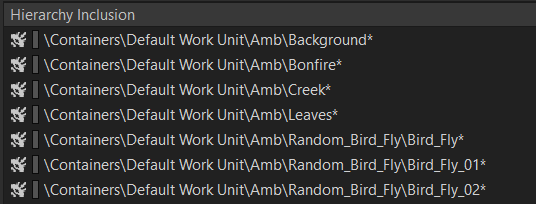
But this also made me start thinking: why is it that sometimes audio can play normally, but event cannot?
After checking the official tutorial:
Audio / Container = the sound itself
Event = the button that plays the sound
SoundBank = the packaged file that the game can access at runtime
Unity = only presses the button, it does not guess where the button is by itself
So sometimes this very strange situation can happen: the audio/container itself exists, but when Unity calls `Open_Backpack.Post()`, Wwise cannot find the runtime information for this Event, so it either does not play, or reports “its soundbank has not been loaded”.
As for the audio that played normally, that is because in the scene I was using the method of attaching `AkAmbient` to an Empty object. `AkAmbient` is originally an ambient sound player component in Unity.
It can directly attach a Wwise object / event to play, and it is more like “this thing in the scene plays sound by itself”. It does not necessarily strictly require you to go through an Event in the same way that a script does.
Meanwhile, the way I triggered opening and closing the backpack was by calling an Event through C#.

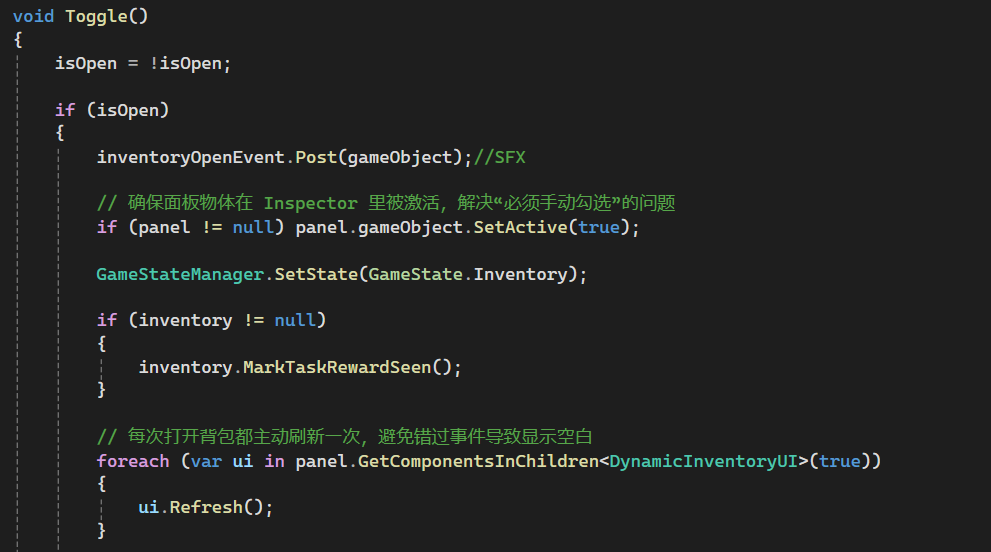
So naturally, it could not find the object, because it was hardcoded here to trigger using an Event, but there was no corresponding Event in my SoundBank. I had the Event, and I had the audio, and both of them were packaged, but they were separate. For Unity, my Event did not contain audio, and the audio did not have a corresponding Event.
Although audio may not cause problems in some situations, to be safe, it is still better to package everything using Events in the future.
Source: https://www.audiokinetic.com/fr/public-library/2025.1.7_9143/?source=SDK&id=concept_banks.html
Leave a Reply