When creating footstep sound changes for different ground materials, I also researched another common method: using Raycast to detect the ground material underneath the player.
Raycast can be understood as an “invisible ray” in Unity. If it is used in a footstep system, a ray can be cast downward from the player’s feet to detect the collider, tag, layer, or material that the player is currently standing on. Then, based on the detection result, the GroundMaterial Switch in Wwise can be changed.
Unity’s official documentation also explains that Physics.Raycast casts a ray against colliders in the scene and returns information about the object it hits.
I tried writing some code for this. Although I have not fully tested the whole system yet, it would roughly look like this:
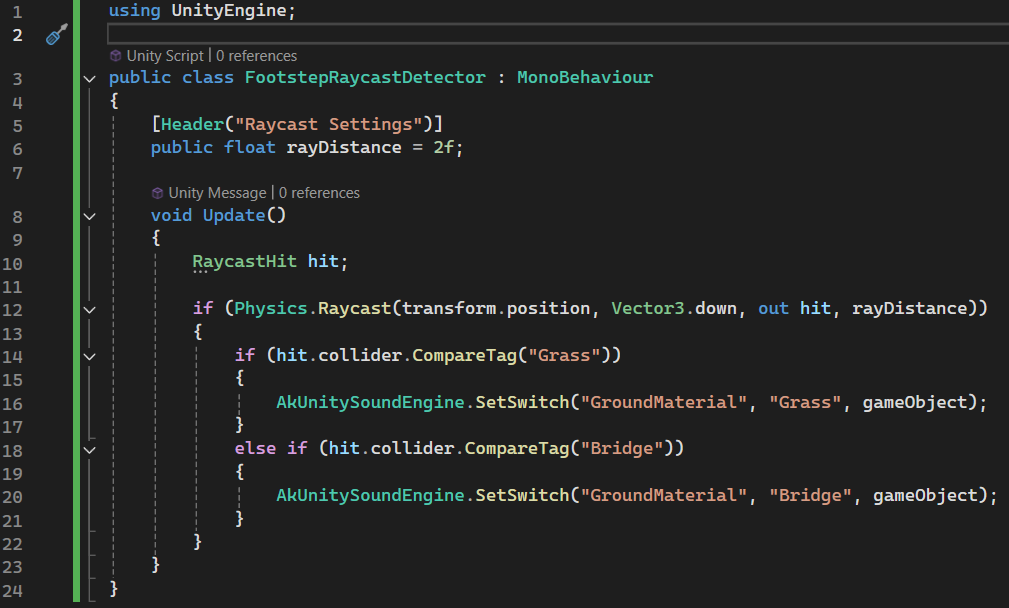
The advantage of this method is that it is more automated. As long as the ground colliders and tags in the scene are set clearly, the script can automatically detect the type of ground under the player wherever they walk. It is suitable for more complex scenes, such as areas that contain multiple materials like grass, wooden bridges, stone paths, mud, and water, especially when the boundaries between these areas are fragmented and inconvenient to cover manually with detectors.
However, Raycast also has higher requirements for the scene setup. First, the ground must have a collider; otherwise, the ray cannot detect it. Second, each type of ground needs clear tag, layer, or material information, otherwise the script cannot determine which footstep sound the detected surface should correspond to. At material boundaries, Raycast may also switch frequently between two materials because of small changes in the detection point. The origin and distance of the ray also need to be adjusted carefully: if the ray is too short, it may not hit the ground; if it is too long, it may pass through the current ground and hit another collider underneath.
In comparison, I eventually chose the transparent trigger detector method for this implementation. This is because we only have three ground materials: grass, dirt, and wooden bridge. Also, the shapes of the dirt path and wooden bridge are very regular, so I can simply place trigger detectors over the wooden bridge and dirt path areas. The logic is to play one type of footstep sound inside the collider range, and another type of footstep sound outside that range. This method is less likely to affect the existing footstep system.
In the future, if the project includes more complex ground types, such as mud, stone paths, water surfaces, or indoor floors, raycast-based surface detection would be a direction worth expanding further.
Unity’s trigger collider can call `OnTriggerEnter` when the player enters a trigger area. The official documentation also explains that `OnTriggerEnter` is called when a collider enters a trigger. This approach is more suitable for the current project, because I only need to switch footsteps between the bridge and grass, and I do not want to heavily rewrite the existing `FootstepPlayer` system.
Resources:
https://docs.unity3d.com/ScriptReference/MonoBehaviour.OnTriggerEnter.html
https://docs.unity3d.com/6000.4/Documentation/ScriptReference/Physics.Raycast.html
Leave a Reply