Today, I tried adding variations to the player’s footsteps based on different ground materials, so that the player can hear the correct footstep sound when walking through different areas. Compared with using the same footstep sound all the time, different footsteps for different surfaces can make the scene feel more spatial and responsive, while also helping the player understand changes in the environment more directly.
For this task, I mainly used a Wwise Switch Container to manage the footstep sounds for different ground materials, and used a transparent trigger detector in Unity to check which ground area the player is currently in.
In Wwise, I first created a Switch Group for the footsteps, which is used to distinguish between different ground types:
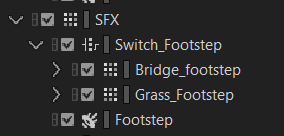
By the way, I used the wrong container type for my SFX, and I only just realised it now. The good news is that it has not caused any issues so far. Normally, I should have used a Property Container.
On the Unity side, I only need to keep triggering the same footstep Event, while Wwise automatically selects the correct footstep sound between Bridge_footstep and Grass_Footstep based on the current Switch state.
In other words, this system does not play different footstep Events separately in Unity. Instead, Unity triggers the Footstep Event, then Wwise checks the current Switch. This Switch Group then selects either Bridge_footstep or Grass_Footstep, and plays the footstep sound for the corresponding material.
The advantage of this approach is that the footstep playback logic can stay unified. If I need to add new ground types later, such as stone, mud, or water, I only need to keep adding new child items under Switch_Footstep, and set the corresponding Switch value in the Unity detector.
On the Unity side, I mainly handled this through two parts of scripting.
First, I modified the original FootstepPlayer script, which is responsible for playing the footstep sounds. In Start(), I set a default Wwise Switch for the footstep system:
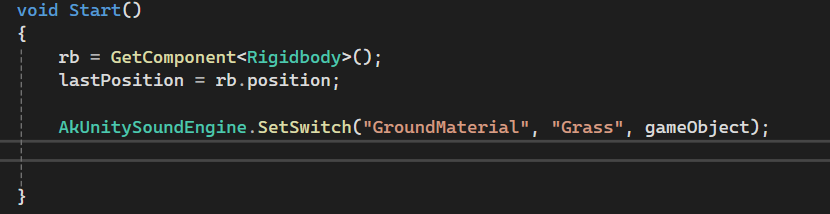
The purpose of this is to make sure the player has a default material state for footsteps when entering the game. Since most areas in the scene are grass, I set the default value to Grass. Without this default setting, before the player enters any detector, Wwise might not know which type of footstep sound it should play. In theory, this could be done directly in Wwise, but because of some strange bugs, my Wwise project could not select any footstep sound as the default, so I had to force it through the script.
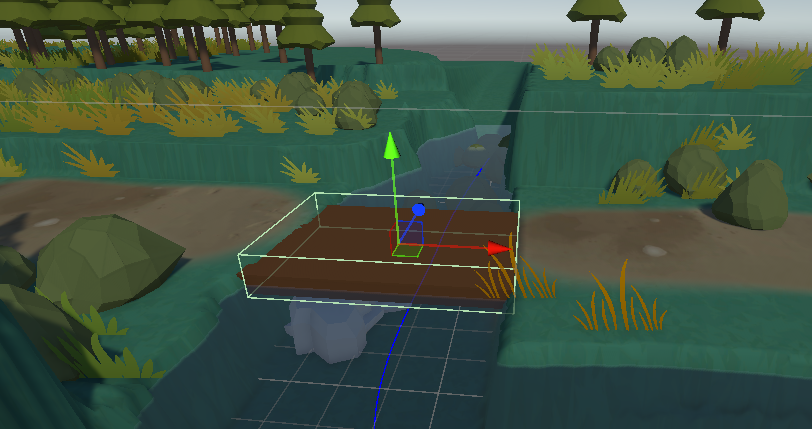
After that, I wrote a new FootstepTrigger script to control the footstep material switching when the player enters a specific area. This script is attached to a transparent trigger collider. It does not block the player, and is only responsible for detecting whether the player has entered a certain area.
This way, each detector can specify its corresponding Wwise Switch in the Inspector. For example, the bridge detector can be set to Bridge_footstep, while a grass area can be set to Grass_Footstep.
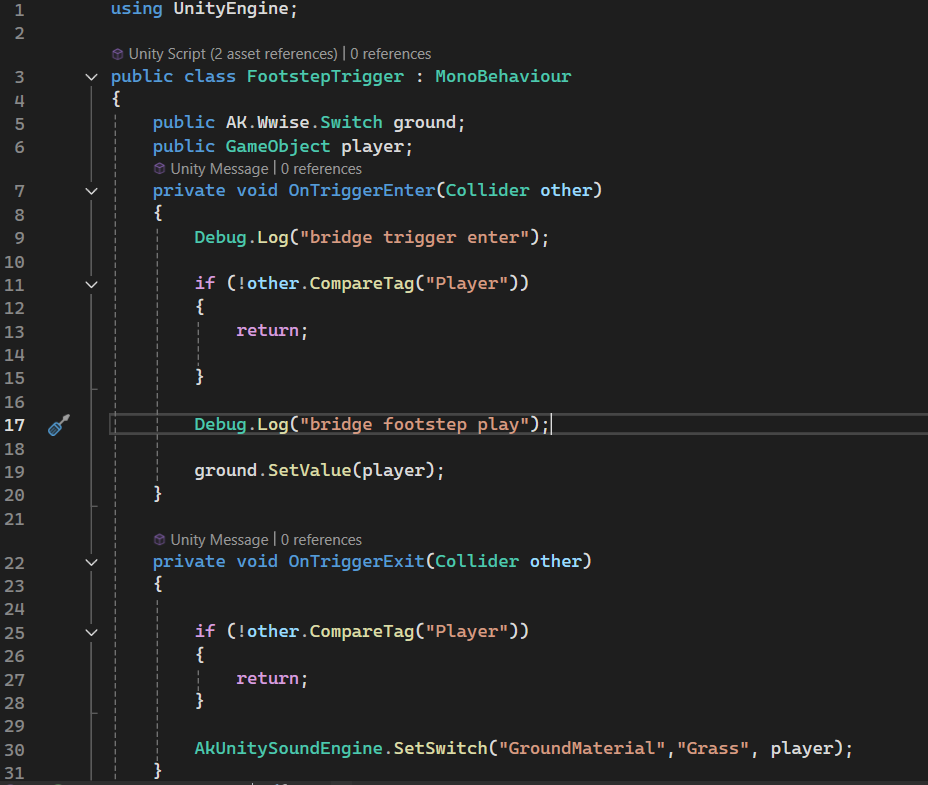
When the player enters the detector, the script checks if the collider is the Player:
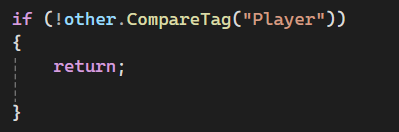
After confirming that it is the player, it then calls:

This switches Wwise’s GroundMaterial Switch to the ground type assigned to that detector. After that, every time the player triggers a footstep sound, Wwise’s Switch_Footstep will play the corresponding footstep audio based on the current Switch state.
To prevent the bridge footstep sound from continuing after the player leaves the bridge, I also switch the footstep material back to the default grass setting in OnTriggerExit():

The Role of the Detector
The detector is a transparent trigger collider with no physical blocking. It does not take part in the visual presentation, and it does not affect the player’s movement. Its only purpose is to tell the footstep system: “the player is now entering a certain type of ground area.”
The advantage of this method is that it is quite straightforward and suitable for the current project. Compared with using raycast to detect the material under the player’s feet in real time, this detector-based method makes it easier to manually adjust the area in the scene, and it does not require major changes to the original footstep playback system.
Resources:
https://www.audiokinetic.com/en/public-library/2025.1.7_9143/?source=SDK&id=concept_switch.html
Leave a Reply