Section Introduction
This section documents the gameplay systems I implemented and tested for Daydream. It is important to clarify that I was not solely responsible for the overall level mechanic design or the full route design. The main level direction, route structure, and gameplay requirements came from team discussion and ideas proposed by other team members. My main responsibility as a Technical Designer / Gameplay Interaction Designer was to translate those ideas into functional systems inside Unreal Engine 5 that could be played, tested, and understood by the player.
During this process, I was not only building Blueprint functionality. I also needed to consider whether the logic between systems was clear. For example, I had to think about when prompts should appear, when the player should be able to pick up an item, how the item should enter the inventory, how the door should check whether the required item had been collected, how climbing and jumping should connect to route progression, and how the final puzzle should be entered and exited.Lorem ipsum dolor sit amet, at mei dolore tritani repudiandae. In his nemore temporibus consequuntur, vim ad prima vivendum consetetur. Viderer feugiat at pro, mea aperiam
Therefore, this section is not about claiming that I designed the entire level. Instead, it shows how I translated the team’s design requirements into playable systems, while giving suggestions based on playability, technical feasibility, and player understanding.
Final Playable Flow
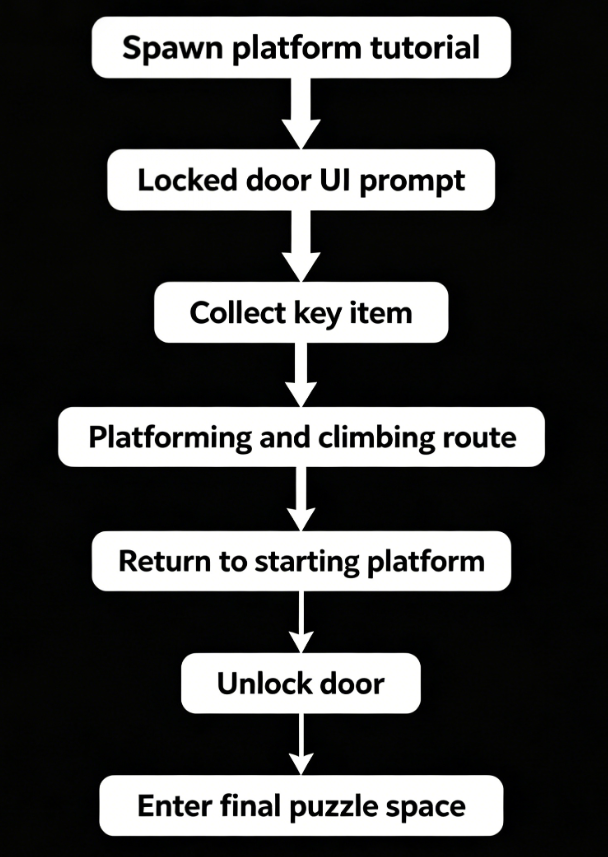
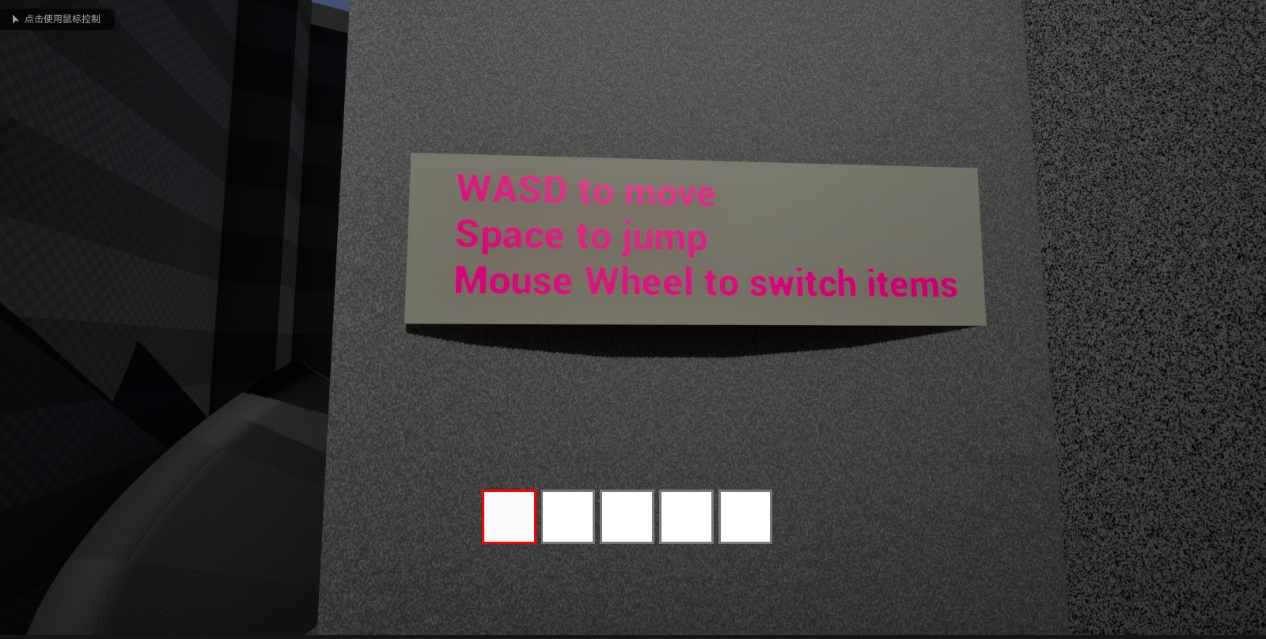
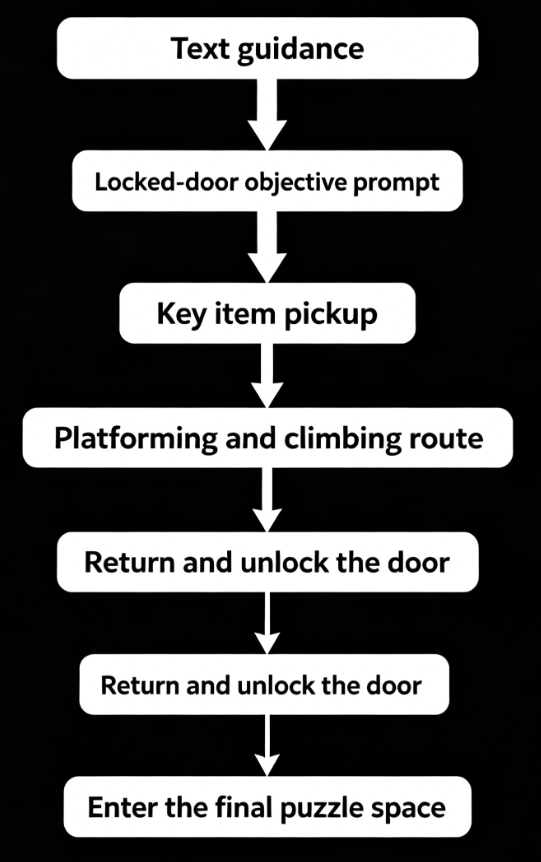
The final playable flow begins on the spawn platform. At the start, text guidance appears near the platform to teach the player the basic movement and jumping controls. This helps the player understand the core controls before entering the main route.
After this, the player reaches a locked door. A UI text prompt appears in front of the door, explaining that the player needs to collect a key item from the level to unlock it. This gives the player a clear short-term goal: find the item, return to the door, and continue progression.
The player then explores the route and collects the first required item. After collecting the item, the player continues through a route that combines platforming and climbing mechanics. Jumping and climbing work together as the main traversal challenge in the level. Finally, the player returns to the starting platform, uses the collected item to unlock the door, and enters the final puzzle space.
This flow connects multiple systems that I implemented
Player Movement & Jumping
Goal
What I Built
Design Purpose
To implement basic player movement and jumping so the player could complete the platforming route and support later systems such as pickup, climbing, door unlocking, and puzzle interaction.
I implemented the player’s basic movement input and jumping input. The player can move through the level, jump between platforms, and progress through the route. This system forms the foundation of the prototype because every later system depends on the player being able to reach the correct spaces.
I implemented the player’s basic movement input and jumping input. The player can move through the level, jump between platforms, and progress through the route. This system forms the foundation of the prototype because every later system depends on the player being able to reach the correct spaces.
Problem / Challenge
Iteration / Fix
The challenge was not only making the player jump, but making sure the movement logic connected clearly with later systems. For example, I had to consider when the player should use normal jumping, when they should enter climbing, and whether they could return smoothly to normal movement after leaving the climbing state.
I separated normal movement from special movements to avoid conflicts between jumping and climbing. This allowed the player to first understand basic platforming before moving into more complex traversal.
Evidence
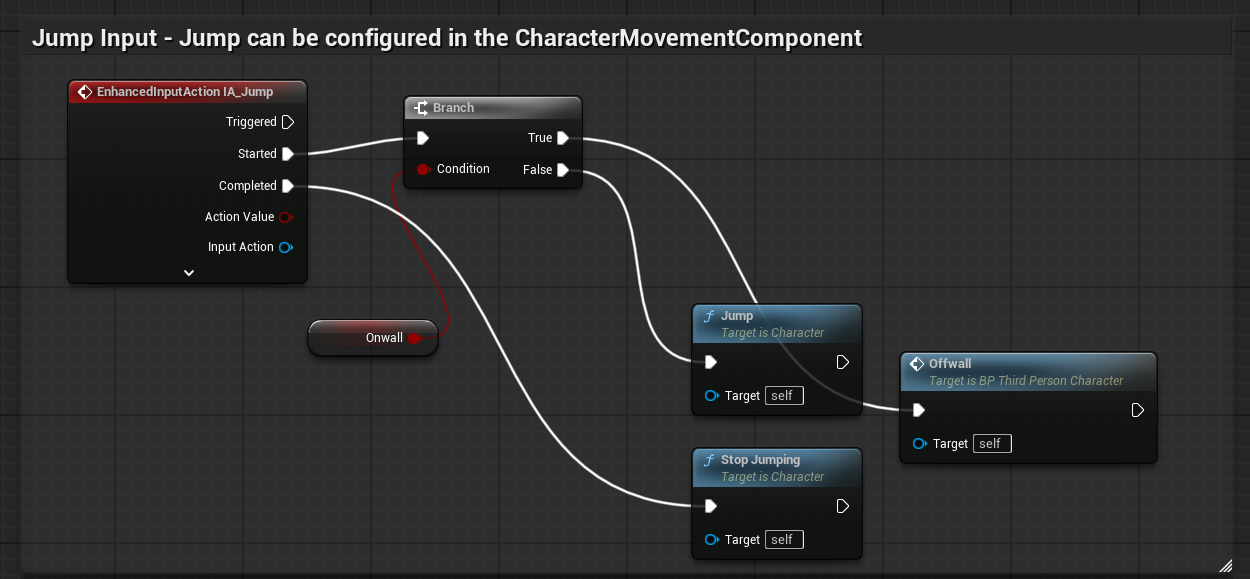
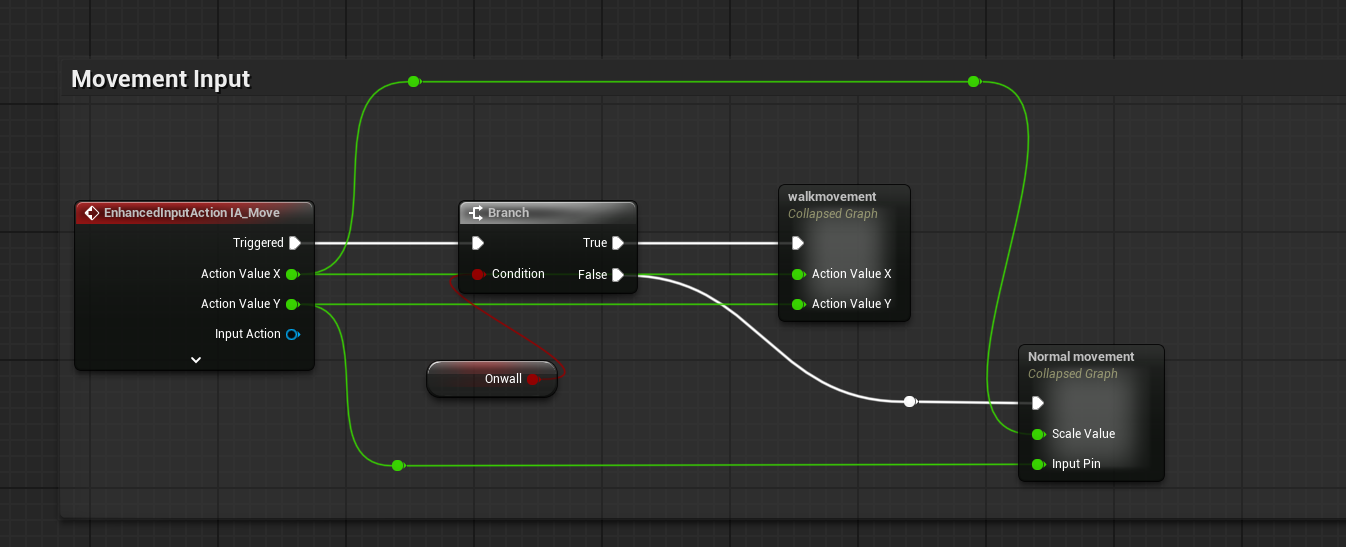
These Blueprints show the basic movement and jump input system I implemented using Enhanced Input. The movement logic separates normal movement from wall-related movement states, while the jump logic checks the wall state before triggering normal jumping. This helped avoid conflicts between platforming and climbing.
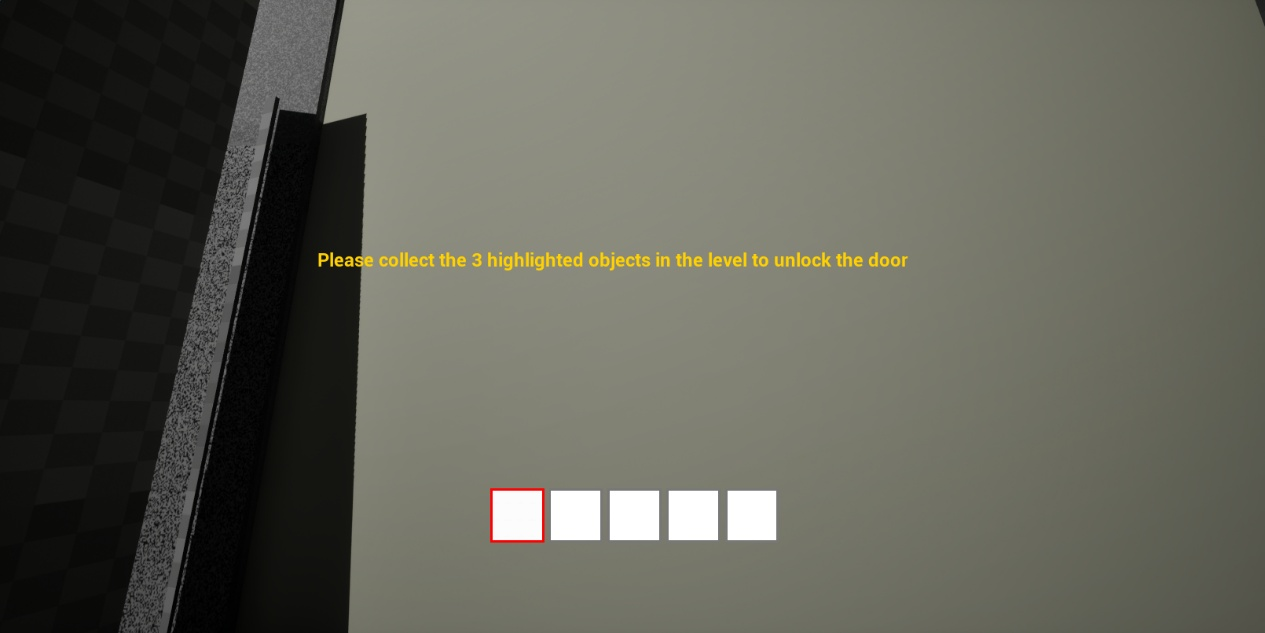
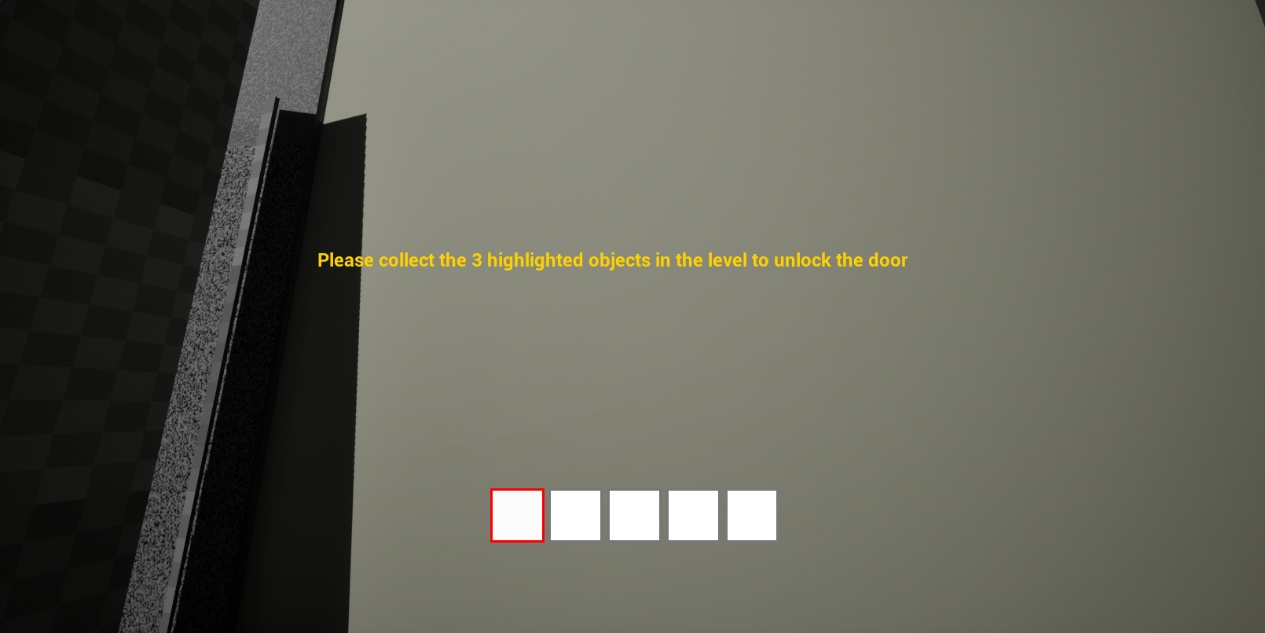
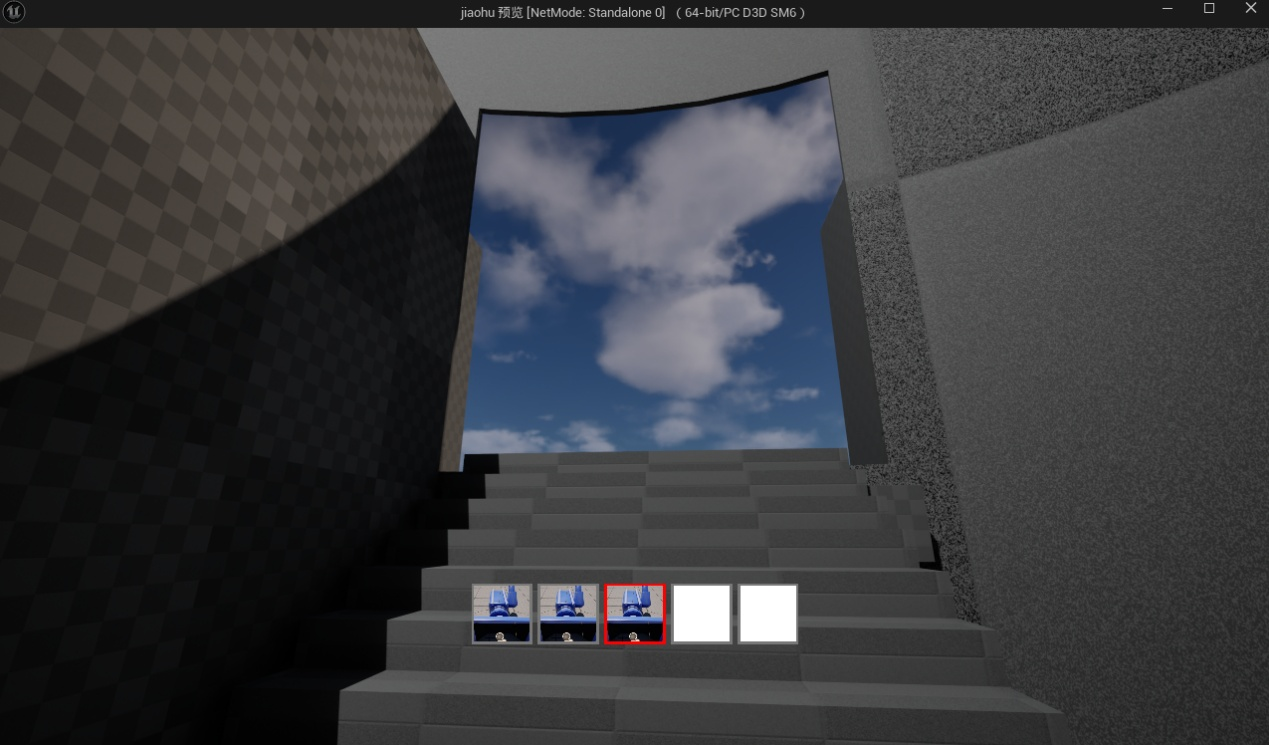
The in-game screenshot shows the early player guidance, where the player is told to collect highlighted objects to unlock the door. This connects the movement section to the wider gameplay flow: explore the level, collect items, and progress toward the locked door.
UI Guidance System
Goal
What I Built
Design Purpose
To use text prompts and UI feedback to help the player understand their current objective and next action.
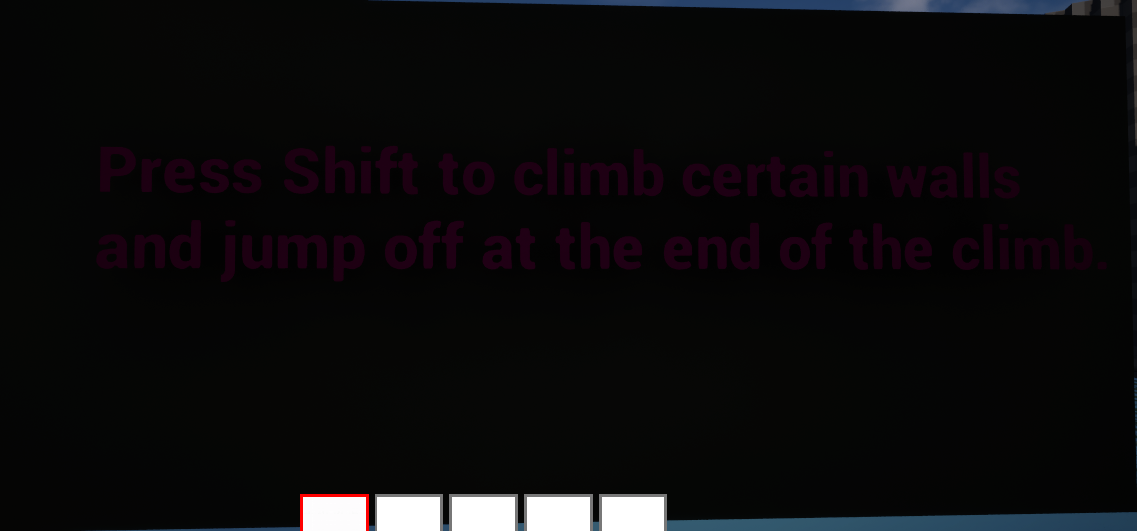
I implemented UI prompts connected to the player flow, including text guidance near the spawn platform and a prompt in front of the locked door explaining that the player needs to collect an item to unlock it. These prompts help the player understand what they can do and why the door cannot be opened yet.
Because the prototype includes movement, pickup, returning to the door, unlocking, and puzzle-solving, the player could easily become confused without guidance. The purpose of the UI guidance system was to reduce the chance of players becoming lost or misunderstanding the mechanics.
Problem / Challenge
Iteration / Fix
The main challenge was balancing the amount of guidance. Too little information would make the player confused, but too much text would make the experience feel like a tutorial manual. My goal was to make the UI appear only at important moments, such as the spawn point and the locked door.
I placed the prompts at key decision points. The spawn platform introduces basic controls, while the locked door explains the need for a collectible item. This allows the UI to support the player without constantly interrupting them.
Evidence
Overall, the UI guidance system helped connect player actions with clear feedback. It reduced confusion by telling the player what they could do next without overloading the screen with constant instructions.
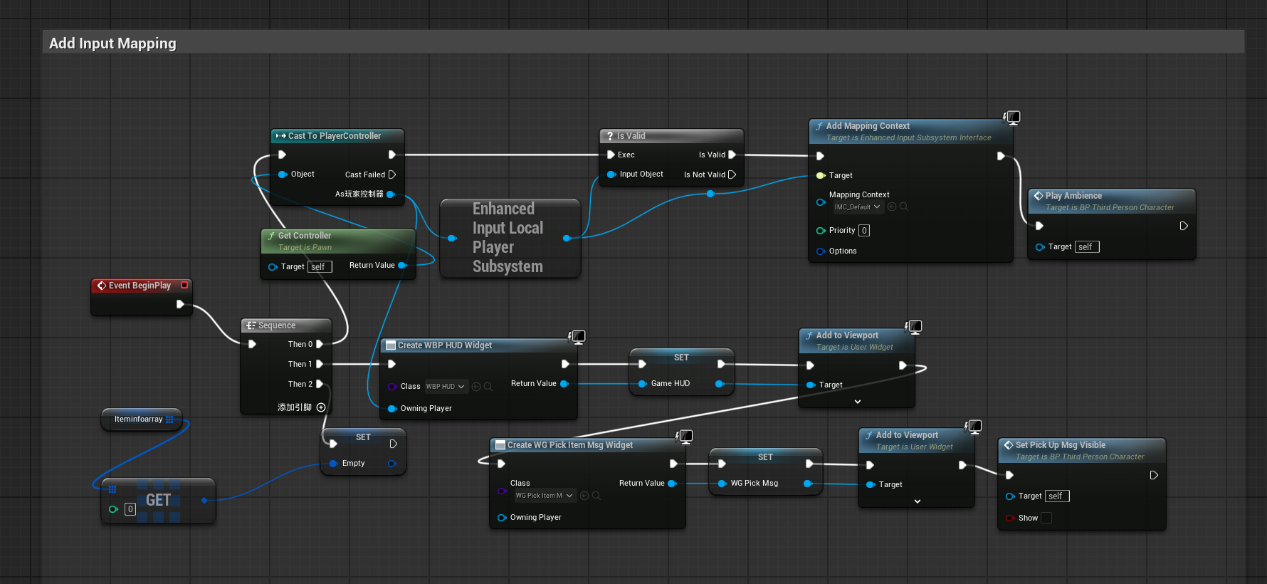
HUD and Pickup Prompt UI Initialization Blueprint
These Blueprints show how I set up and controlled the UI guidance system. The HUD and pickup prompt widgets are created at the start of the game and added to the viewport, while the pickup prompt is hidden by default until the player reaches an interactable object.
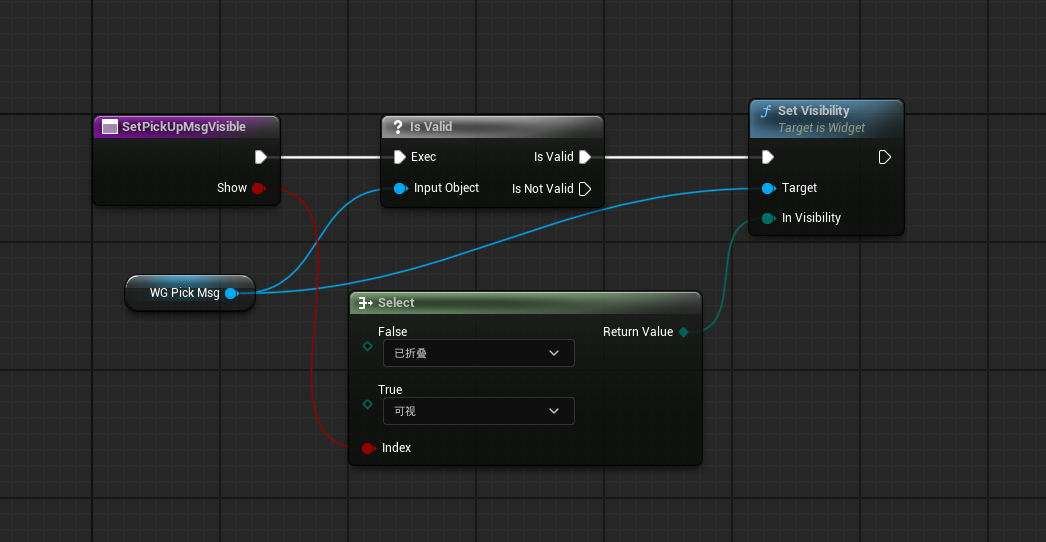
Pickup Prompt Visibility Control Blueprint
The pickup prompt visibility logic checks whether the widget is valid before showing or hiding it. This helped avoid UI errors and made the player feedback more reliable. In the playable flow, these UI prompts were used to guide the player at key moments, such as learning the objective, understanding that the door requires collected items, and recognising when an object can be picked up.
Interaction, Pickup & Drop System
Goal
What I Built
Design Purpose
To allow the player to interact with important items in the level and pick up or drop objects.
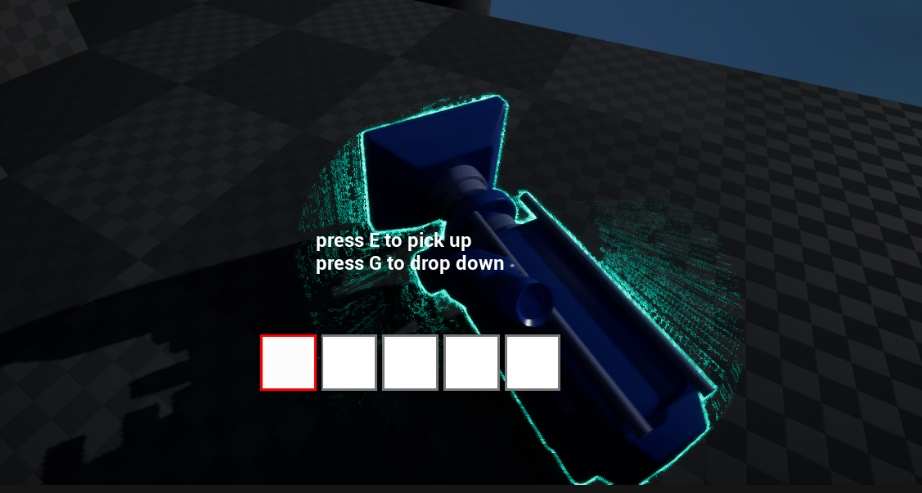
I implemented the interaction logic for scene items. When the player approaches an interactable item, a pickup prompt appears. When the player leaves the interaction range, the prompt is hidden. When the player presses the interaction key, the item is picked up and connected to the inventory logic. I also implemented item dropping, allowing the item to be spawned back into the world.
This system supports the core flow of “collect item → unlock door”. The player does not simply walk past an object; they can recognise it, pick it up, and use it as part of progression.
Problem / Challenge
Iteration / Fix
The main challenge was keeping the logic clear. For example, should the prompt appear when the player enters the interaction range? Should it disappear when the player leaves? Should the scene item be destroyed after pickup? Which inventory slot should the item enter? What happens if the slot already contains an item? These logic questions affected both system stability and player understanding.
I broke the interaction into clear steps: detect player overlap, show prompt, accept input, pick up item, update inventory, and hide or destroy the scene item. This made each system state easier to understand and easier to connect to player feedback.
Evidence
Inventory Item Drop Logic
Scene Item Pickup Interaction System
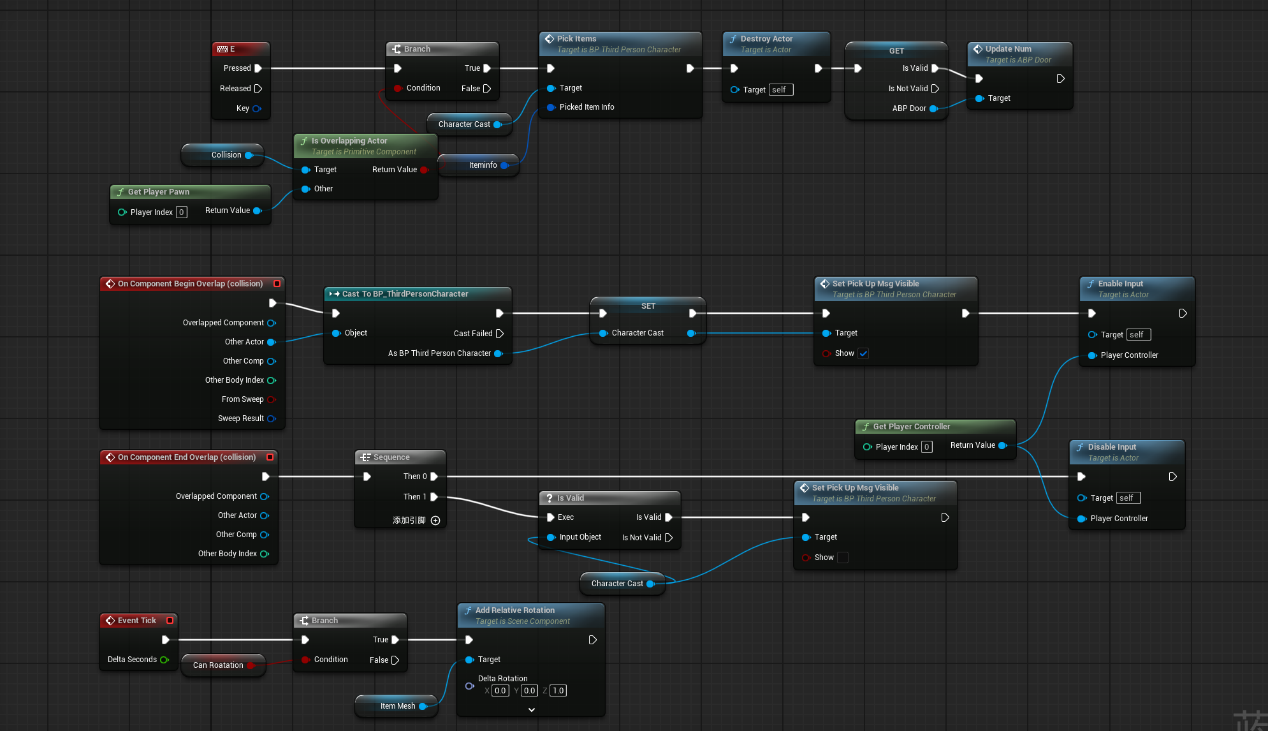
These Blueprints show how I implemented the interaction, pickup, and drop system. The scene item interaction Blueprint detects when the player enters or leaves the item’s collision area, then shows or hides the pickup prompt and enables the player to interact with the object.
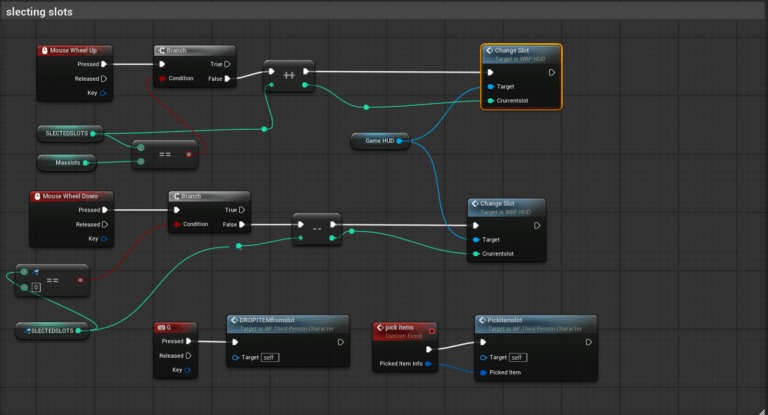
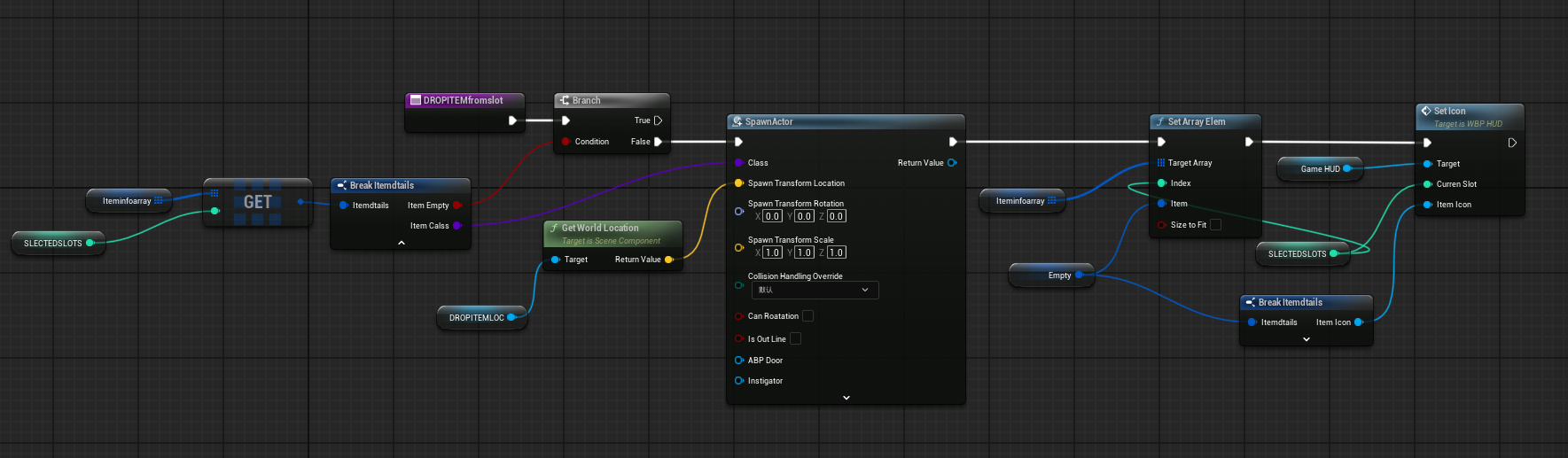
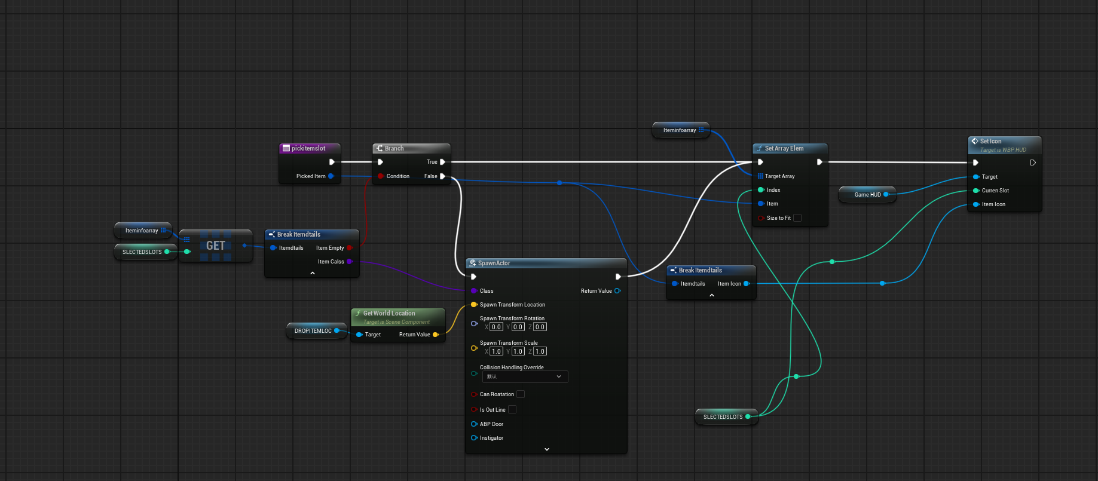
The pickup logic connects the scene object to the inventory system. When the player collects an item, the object is removed from the level, and its item data is passed into inventory. The drop logic works in the opposite direction: it checks the selected inventory slot, spawns the item back into the world, clears the slot, and updates the UI.
Together, these systems made item interaction part of the playable progression. The player can identify an item, pick it up, receive feedback through the inventory, and use that item state to support later systems such as door unlocking.
Glowing and Rotating Item Feedback
Goal
What I Built
Design Purpose
To make key items easier for the player to notice and reduce the chance of missing important objects in the level.
I added glowing and rotating feedback to important collectible items. The glow effect highlights the item’s importance, while rotation helps separate the item from normal environmental props.
Because the player needs to collect an item to unlock the door, missing the item would stop the progression flow. Item feedback is therefore not only a visual effect; it is also part of player guidance.
Problem / Challenge
Iteration / Fix
The challenge was to make the feedback visible without making it too distracting. If the effect is too strong, it can break the atmosphere. If it is too subtle, the player may still miss the item.
I used clear glow and rotation feedback so the key item could be identified more easily. This worked together with the locked-door UI prompt: the door tells the player they need an item, and the glowing object helps them recognize the item in the level.
Evidence
Item Rotation Blueprint
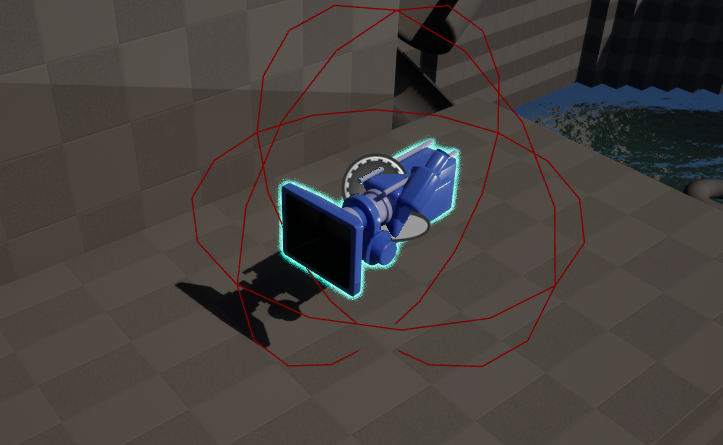
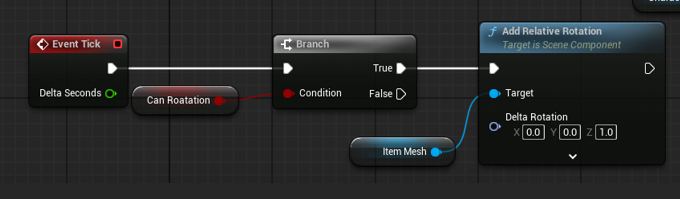
This Blueprint section shows the item rotation feedback used for collectible objects. The item mesh is rotated during gameplay so that important objects are easier to notice and can be separated from normal environment props.
The glow effect is shown through the in-game item visuals, while the Blueprint evidence focuses on the rotation logic. Together, glow and rotation helped guide the player toward key objects without relying only on text prompts. This was important because missing a key item could block the door-unlocking flow.
Inventory UI System
Goal
What I Built
Design Purpose
To give the player clear feedback after collecting an item, so they know they have obtained the required object.
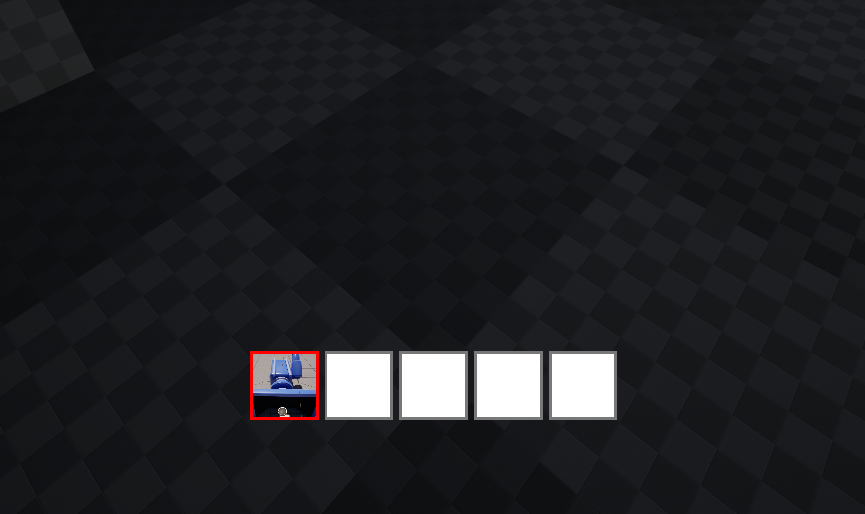
I implemented the inventory UI, slot switching, UI updates after pickup, and UI updates after dropping items. When the player collects an item, the inventory updates to show the current item state.
The inventory UI connects player action with system state. If the player presses the pickup key but receives no feedback, they may not know whether the item was collected. The UI therefore confirms the result of the player’s action.
Problem / Challenge
Iteration / Fix
The main challenge was keeping the UI state consistent with the item logic. For example, does the icon update when an item enters a slot? Is the slot cleared after dropping an item? If an item is replaced, does the UI show the correct object? These issues require Blueprint logic and UI logic to stay synchronized.
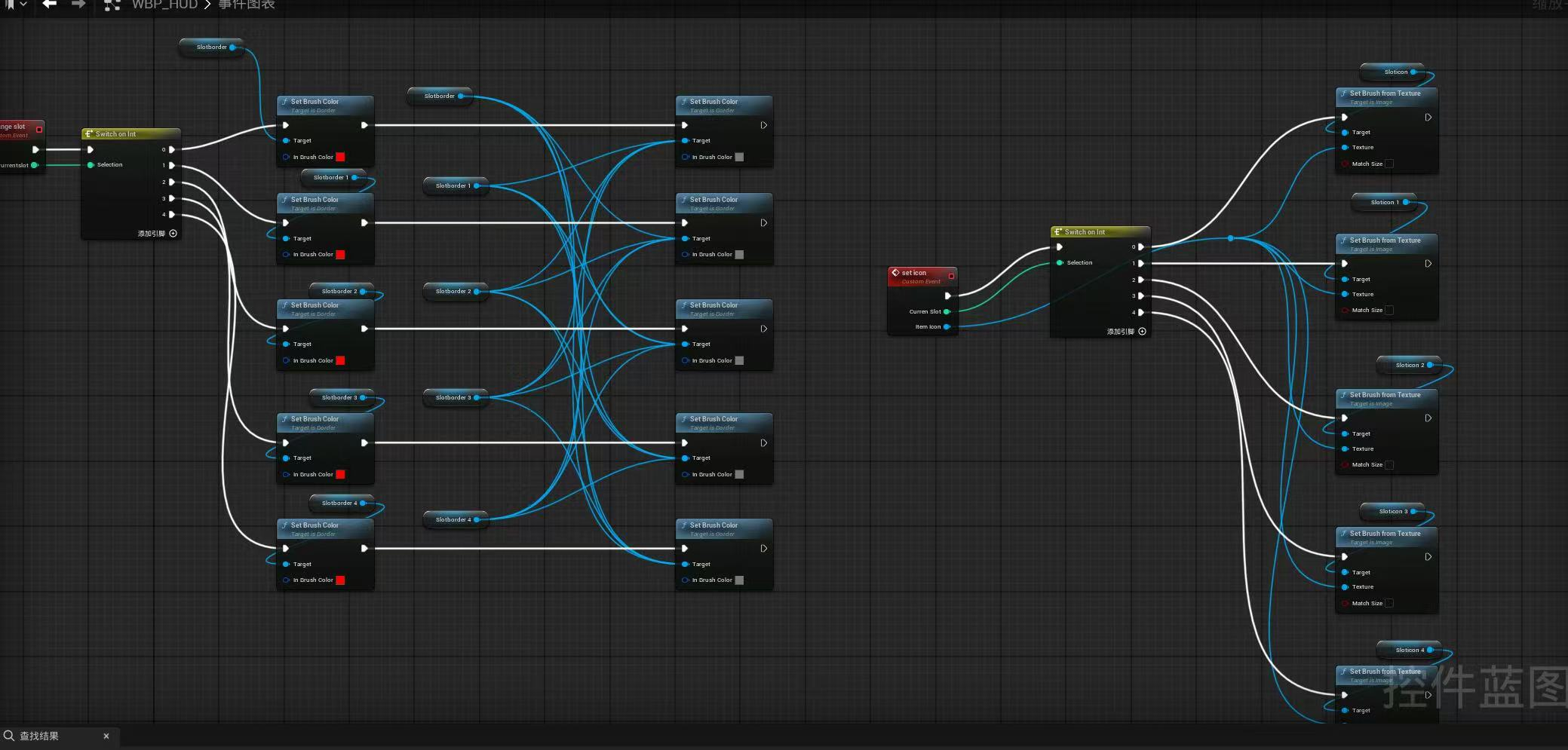
I connected item pickup, slot data, and HUD icon updates so that the UI changes whenever the inventory state changes. This allowed the player to confirm whether they had collected the required item.
Evidence
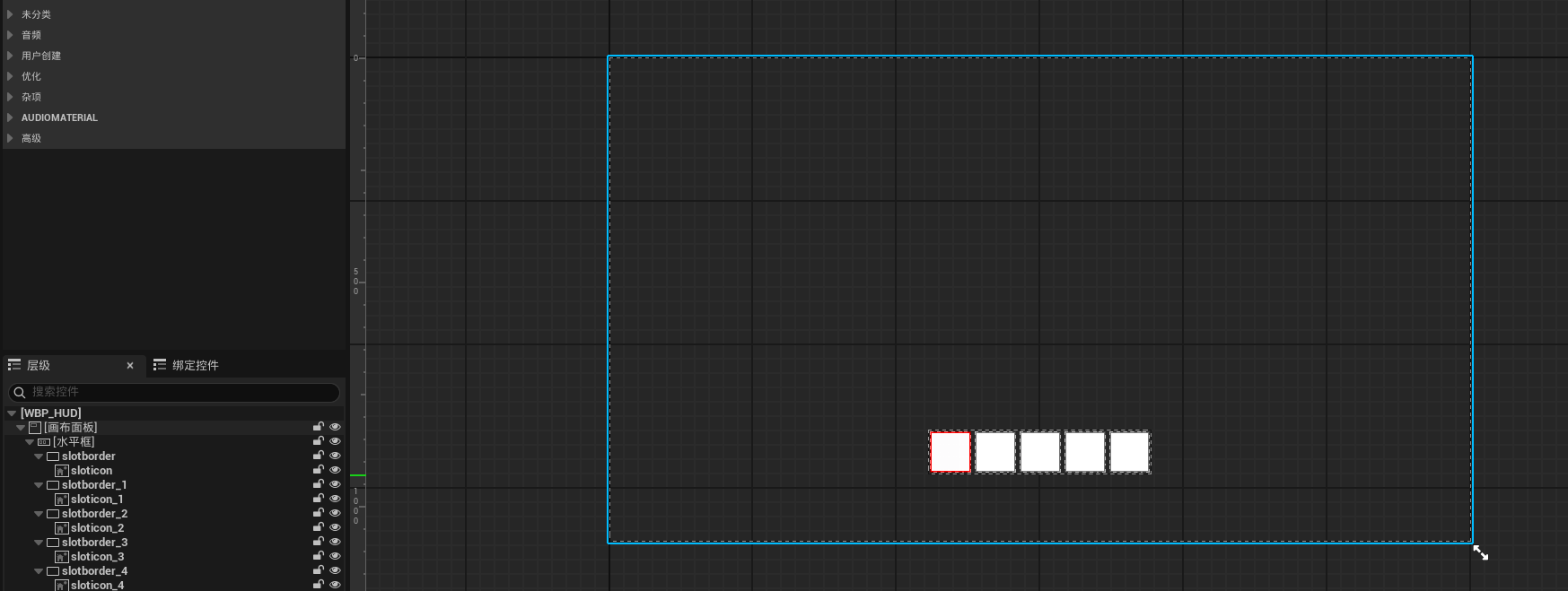
Inventory UI View
Item Pickup Logic Blueprint
Slot Replacement Logic Blueprint
These images show how the inventory UI connects item collection with player feedback. The inventory view displays the player’s current item state, while the pickup and slot replacement logic updates the selected slot when an item is collected.
These images show how the inventory UI connects item collection with player feedback. The inventory view displays the player’s current item state, while the pickup and slot replacement logic updates the selected slot when an item is collected.
Key-item Door Unlocking
Goal
What I Built
Design Purpose
To implement the flow where the player collects a key item, returns to the starting platform, and unlocks the door.
I implemented door-unlocking logic that checks whether the player has collected the required item. If the player does not have the item, the UI prompt explains that they need to collect it from the level. If the player has collected the item, they can return to the door, unlock it, and enter the final puzzle space.
This system connects item pickup with level progression. The door is not just a static object; it acts as a progression gate. It tells the player that their current goal is to find the item, complete the route challenge, and return to continue the level.
Problem / Challenge
Iteration / Fix
The main challenge was making sure the door could correctly read the player’s item state. If the door cannot check whether the player has collected the item, the progression breaks. The door prompt also needs to be clear, otherwise the player may not understand why the door cannot open.
I connected the door-unlocking logic with the item pickup state and used UI prompts to explain the door condition. This helped the player understand that the locked door is intentional and requires a specific item.
Evidence
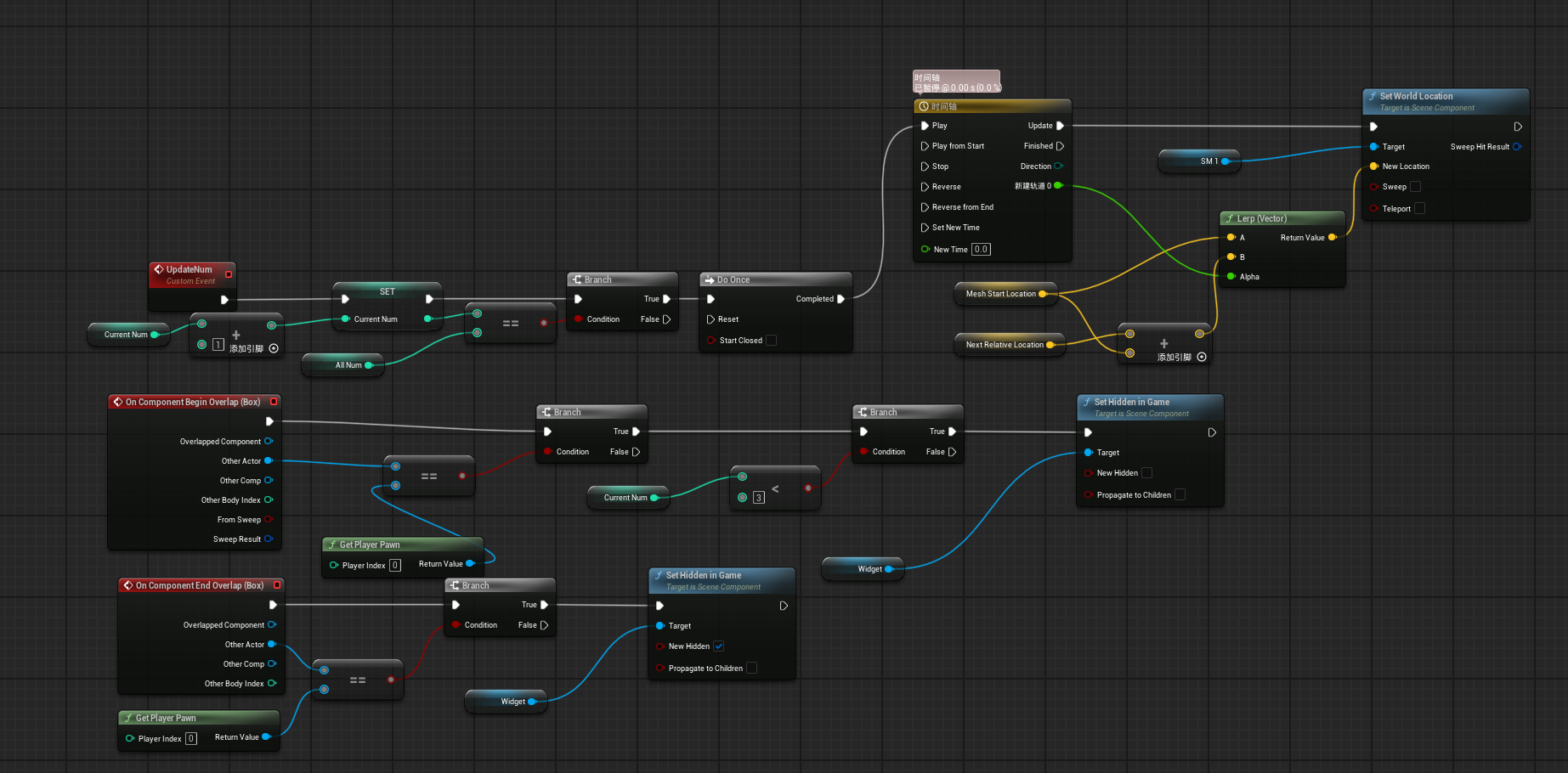
Door unlocking Blueprint. The system updates the collected item count, checks whether the required number has been reached, then triggers a Timeline and Lerp movement to open the door. It also controls the door prompt widget visibility when the player overlaps with the door area.
Climbing System
Goal
What I Built
Design Purpose
To implement a climbing system that allows the player to complete part of the level route through a special traversal mechanic.
To implement a climbing system that allows the player to complete part of the level route through a special traversal mechanic.
The climbing system adds variety to the level route. After collecting the item, the player encounters a new traversal challenge instead of only continuing with walking and jumping. This makes the vertical slice feel more varied as a gameplay sequence.
Problem / Challenge
Iteration / Fix
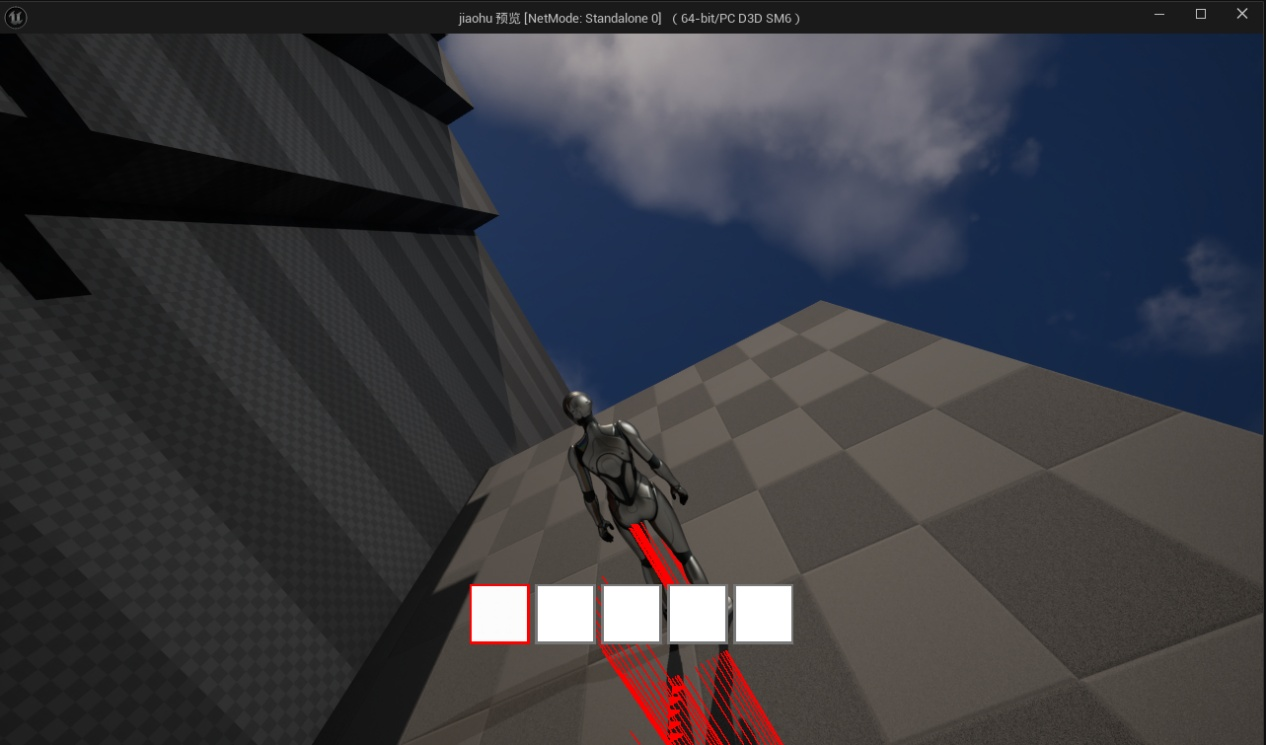
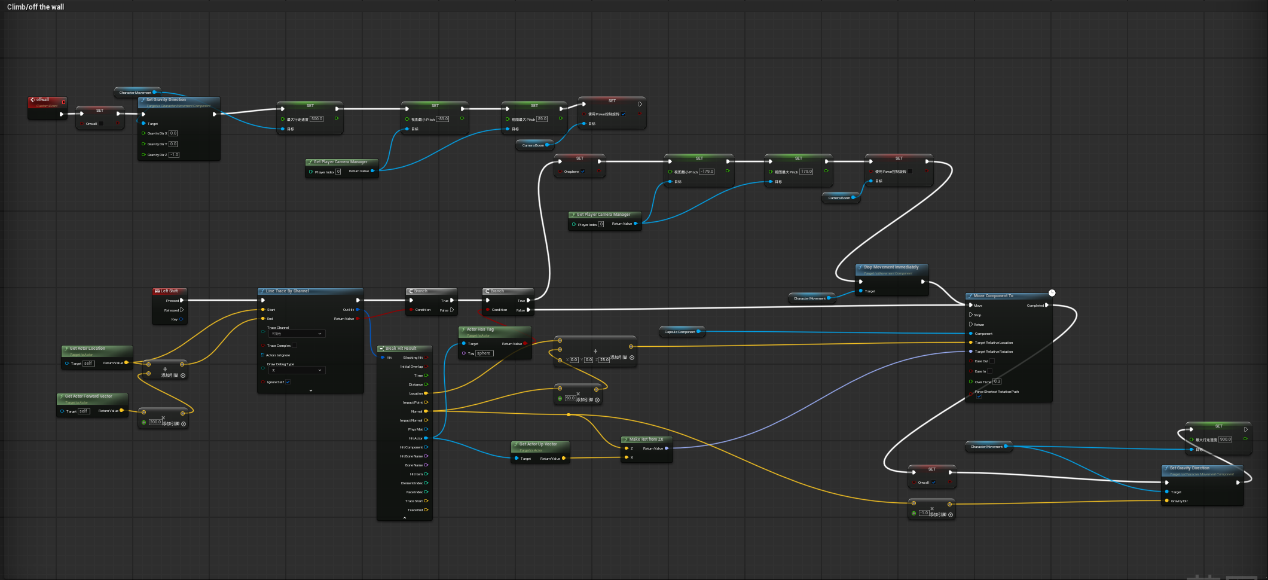
The main challenge was making climbing work logically with normal movement and jumping. For example, when should the player enter climbing? Which walls are climbable? Should gravity affect the player while climbing? When should the player exit the climbing state? If these states are unclear, the controls can become confusing.
I used wall detection and climbable conditions to control whether the player can enter the climbing state. I also handled movement while climbing, so the mechanic only works in specific route-related areas rather than triggering randomly.
Evidence
Final Puzzle Interaction System
Goal
What I Built
Design Purpose
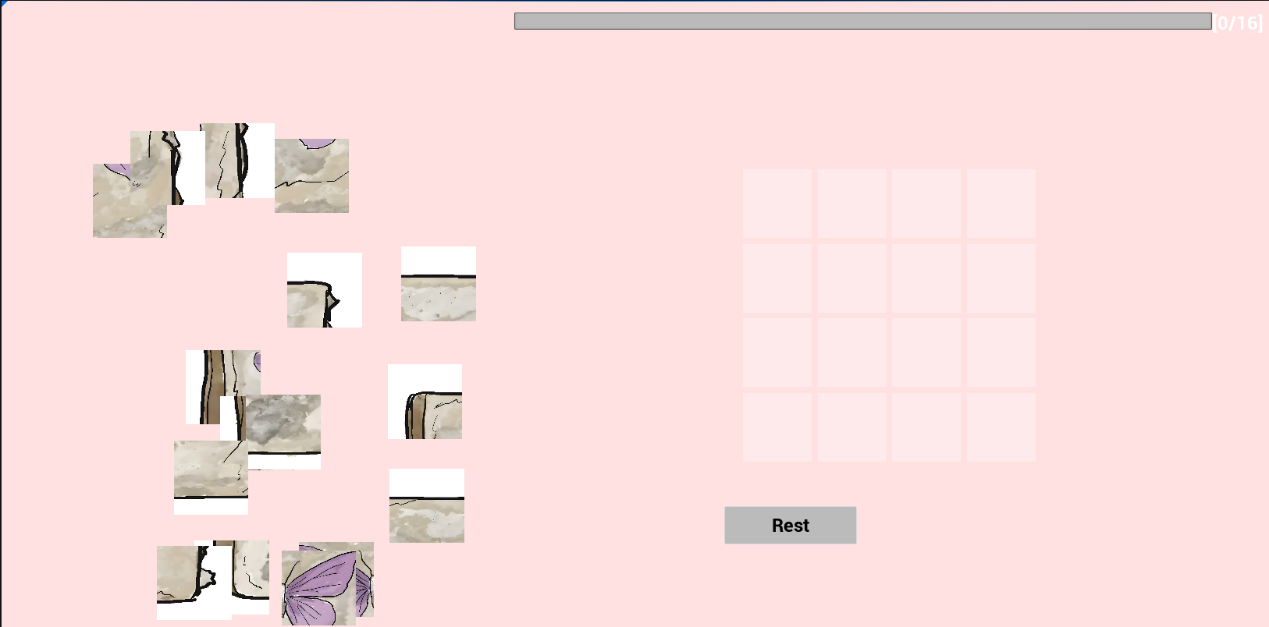
To allow the player to enter the final puzzle space after unlocking the door and trigger the final grid-based puzzle interaction.
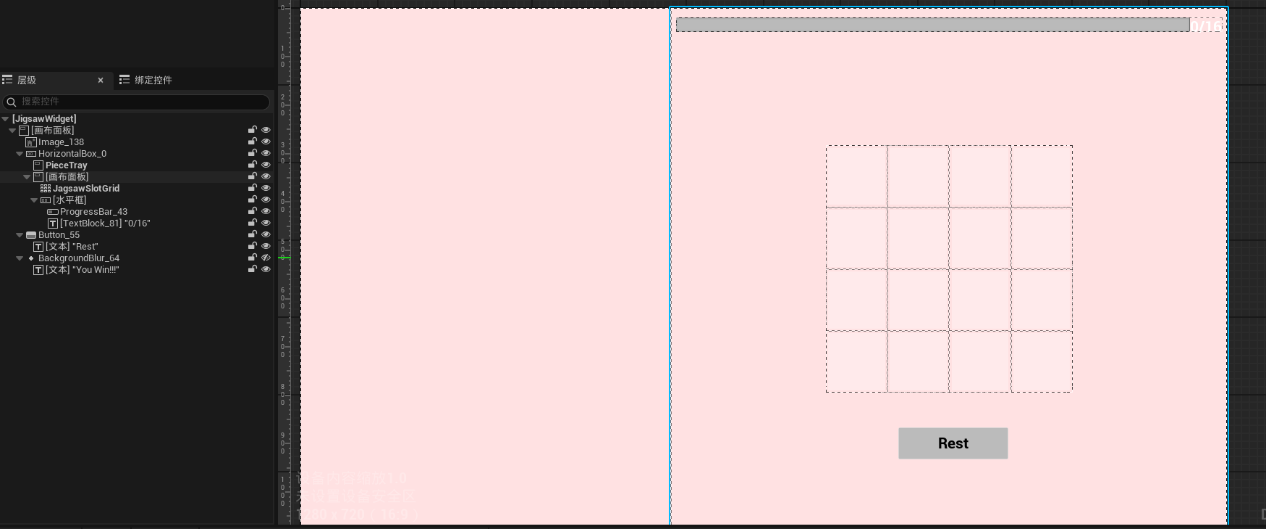
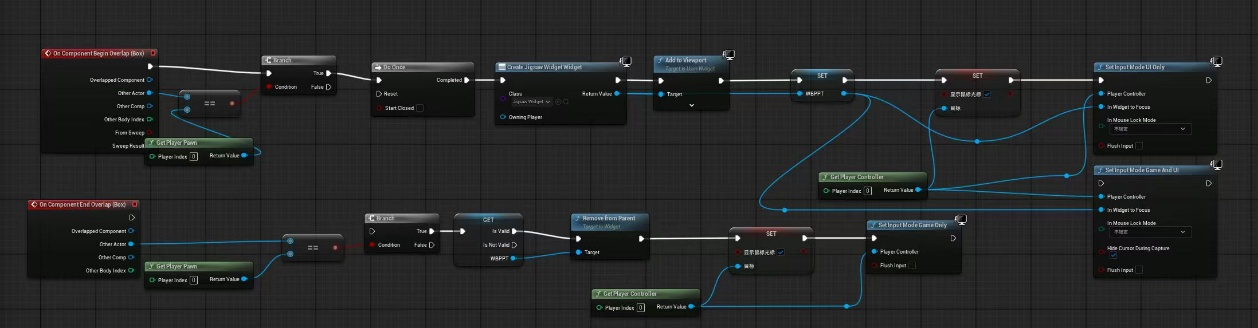
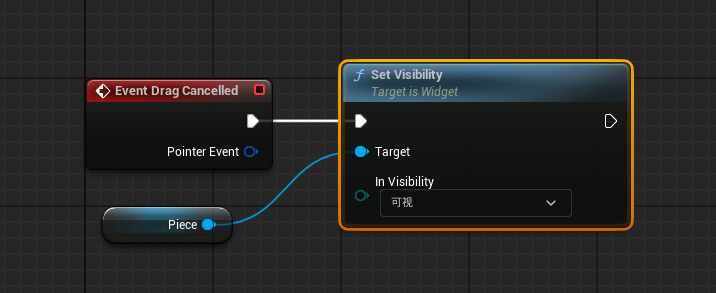
I implemented the trigger and UI interaction logic for the final puzzle. When the player enters the puzzle area, the system opens the puzzle interface and switches the input mode from normal gameplay to UI interaction. The player can then use the mouse to interact with the puzzle interface. After completing or exiting the interaction, normal gameplay control is restored.
The final puzzle acts as the endpoint of the playable sequence. After completing movement, pickup, climbing, returning, and unlocking, the player enters a different type of challenge based on logical interaction. This system turns the previous level progression into a final objective.
Problem / Challenge
Iteration / Fix
The main challenge was switching between gameplay and UI interaction. If the mouse cursor does not appear when the puzzle opens, or if the player cannot regain control after leaving the puzzle, the experience breaks. Therefore, the puzzle is not only a UI element; it also requires correct input mode and player control logic.
I connected the puzzle trigger, widget creation, input mode switching, mouse cursor visibility, and exit logic so that the final puzzle could function as part of the level flow.
Evidence
Unused Experiment: Camera Hidden Clue System
Goal
What I Built:
During the early experimentation stage, I worked on a camera-based hidden clue system based on ideas discussed within the team. The idea was that the player could enter a camera observation mode and see clues or information that were hidden from the normal view. This could provide additional information to support puzzle-solving or level progression.
I experimented with a mechanic where the player could use a specific input to enter a camera view and observe hidden information. This was mainly a test of an alternative player guidance method. Instead of directly telling the player what to do through text, the system would allow the player to actively discover clues through observation.
Why It Was Not Used
What I Learned
This feature was not included in the final vertical slice. The main reason was that, after further team discussion, the group developed a new direction for the core mechanics. The final version focused on a more direct playable flow: spawn platform guidance, item collection, platforming and climbing, returning to unlock the door, and entering the final puzzle space.
As a result, the camera hidden clue system was replaced by the team’s updated mechanic direction. It was not removed because it was impossible to implement, but because the team adjusted the design direction and chose a set of mechanics that better supported the final playable version.
This experiment helped me understand that mechanics can change during prototype development as the team discusses and refines the design direction. Even if an early mechanic has already been partially implemented, it may be replaced when the team develops a stronger or more suitable idea. As a Technical Designer, I needed to adapt to these changes and focus my implementation work on the systems that best supported the final playable vertical slice.
Evidence
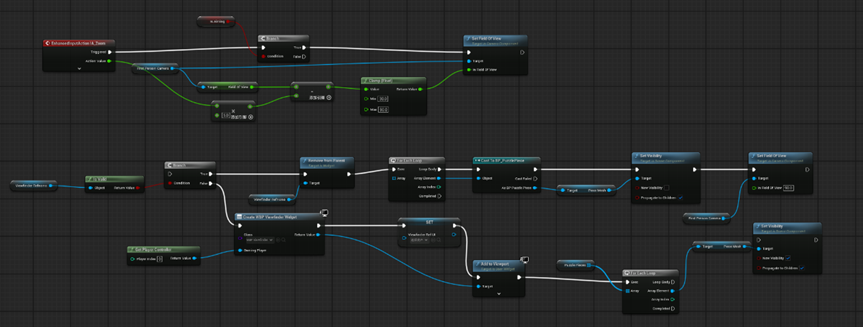
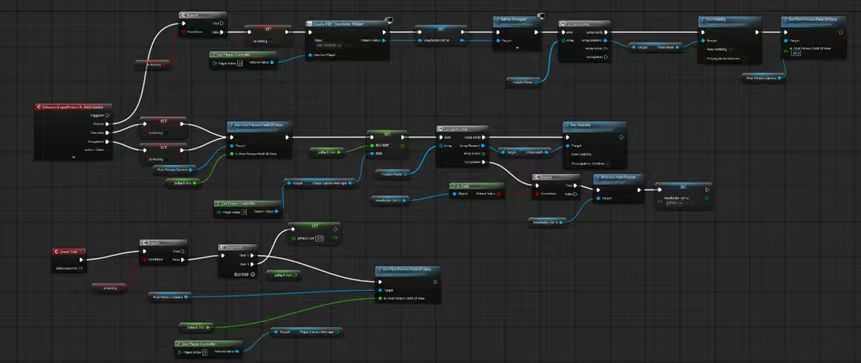
Early camera hidden clue experiment Blueprint. This Blueprint used Aim Camera input, a Viewfinder UI, FOV changes, and Puzzle Pieces visibility switching to test a mechanic where hidden puzzle clues could only be seen through a camera-style view. The feature was not later used after the team developed a new mechanic direction.
Communication and Translation of Team Ideas
One important challenge in this project was translating ideas from team discussions into playable systems. Many team ideas were initially quite conceptual, such as “the player needs to collect something to open a door”, “there should be a climbing route”, or “the player should enter a final puzzle space”.
As a Technical Designer, I had to break these ideas down into concrete rules:
When does the player trigger it?
What input does the player use?
How does the system check whether the player meets the condition?
How does this feature connect to the next part of the flow?
Does it need a UI prompt?
What is the success state?
What is the failure state?
This process helped me understand that technical implementation and team communication are closely connected. A teammate’s idea cannot easily become a playable mechanic unless it is broken down into clear interaction rules. I also needed to explain to the team that turning an idea into a playable system is not simply “adding a feature”; it requires trigger conditions, feedback, state changes, testing, and connections to other systems.
Therefore, my contribution was not only building Blueprints but also giving suggestions from the perspective of playability and technical logic during implementation.
Communication and Translation of Team Ideas
Together, these systems supported the playable sequence of Daydream:
This project helped me understand that technical design is not only about “making features”. It is about connecting features into clear logic. A system functioning technically is only the first step; more importantly, it needs to help the player understand their objective, complete actions, and progress through the vertical slice.