This is the Garntt chart at the end of the sprint. The click-to-drag code is still not working, so I put it off for now as it isn’t necessary. Other than that, everything else is either underway or gone to plan, as seen below.

Our original plan for the sprints was a period of 2 weeks, but I decided on 3 instead.
I’ll try to include weekly playtests and “game feel” with at least 1 person for each sprint. I also decided to use the Gantt schedule because learning Jira was a bit stressful, so I chose a simpler schedule.
Week 1 (26/01/2026 to 1/02/2026)
The first week was a huge learning curve for me. Learning Unity again after not touching it for a few months was really hard. I started by creating the most basic function of the game – the Edge Pan. This means when the mouse cursor goes to the edge of the screen, it will keep moving towards that side. I found a code on Reddit that was exactly this is and tweaked it until the results were what I wanted.
^ This is me emulating the way I wanted the camera to move at first. ^


^ This is the result of the “first pass” of this code. ^
Note that the borders did not work yet here, as I was still figuring out how to make them work.

^ These were the current settings enabled. ^

^ I would also like to add a function to drag with the right mouse, but this code did not end up working, so I’d like to continue to find a fix for it or rework it entirely.^

By the end of the week, I added a drag-and-drop code for some of the 3D objects in the world to be moved around. This code could also be used to move the NPCs for more immersion, as we proposed in our brainstorming from semester 1.
Week 2 (2/02/2026 – 8/02/2026)

- I continued with modelling the hand I started from semester 1, refining it by joining the thumb and forefinger and smoothing it out with sculpting tools. This first pass looks alright, but I’ll have to make the code work in order to continue with it. Jordan advised me not to pay too much attention to this until later on in the production cycle.
- In the prototype, I added some sketches from Hayley to test how a background would work with the build.

- My drag-and-drop code works, but the cube jitters at times. Sometimes setting the interpolation mode helps with this. Another problem is that it goes through the floor. Ross gave me some advice and said it was due to using transform.position rather than using the rigidbody. “transform.position” doesn’t take physics into note, as a rigidbody does, so I will have to refactor the code accordingly.

- Problem code in red. I’ve learned that transform.position is good for basic movement, but it ignores all collisions, making it terrible for a drag-and-drop code like mine.
Week 3 (9/02/2026 – 15/02/2026)
- During week 3, I added an NPC to the game. This is a test for interactions between characters and the player. I also pushed the camera back as the close-up angle felt too cramped.
- I also changed the platform to green, as the red and white were just to test whether the edge pan code was working. The green is closer to how the ground would look.
1st Sprint Playtest
In this playtest, I asked one of my classmates, Rosie, to test out the controls of the game and what she thought of the current aspects. I asked her questions that are relevant to this playtest, and each of the questions will be updated to reflect what the game currently has.


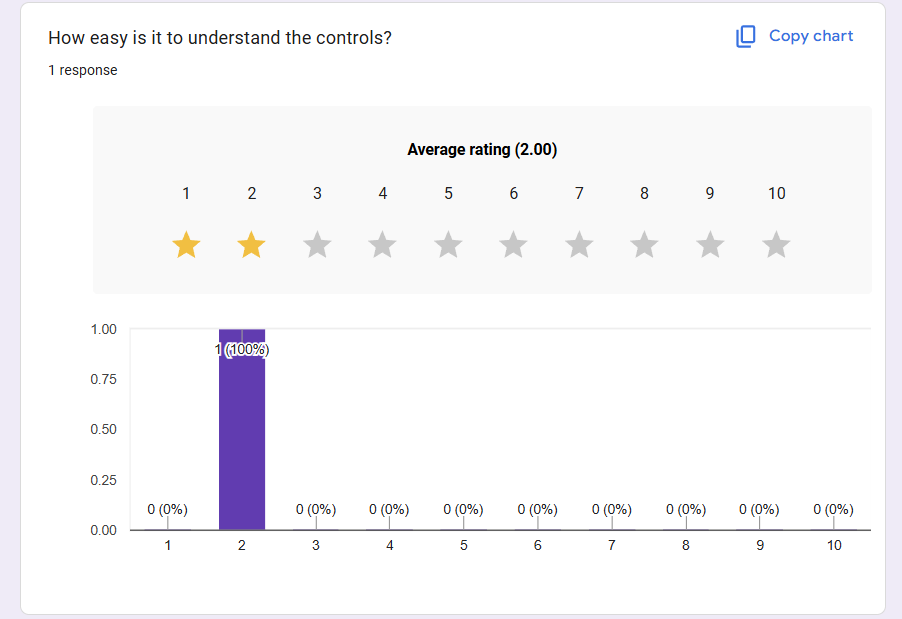


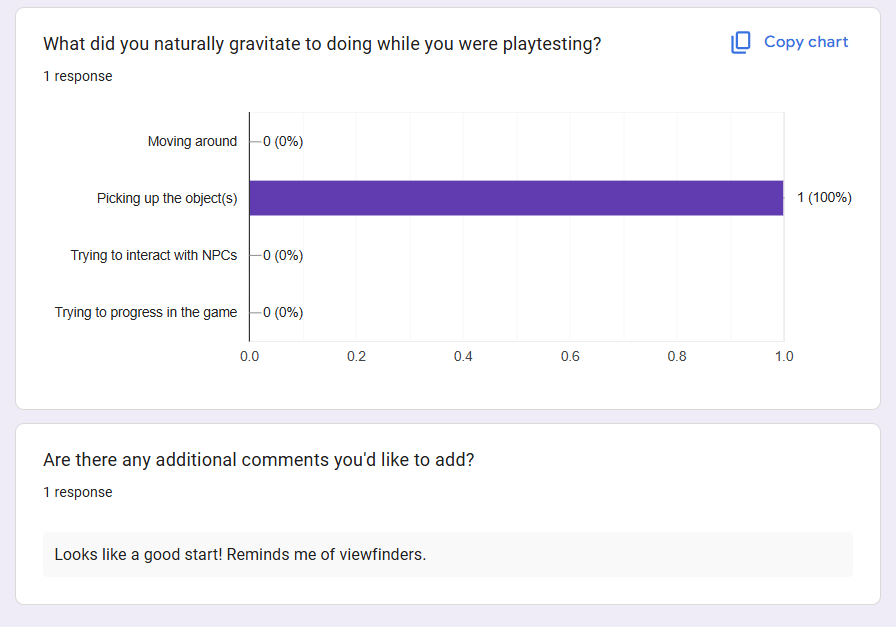
Conclusion of the playtest – Results Simplified
| What I noticed | What do they like? | What can I improve on? |
| • Rosie didn’t know how or where to move at first • She was generally confused about the controls | • She likes the gameplay • She said she likes the idea of the player controller being hands instead of a cursor | • Add text saying the controls are in the corner of the screen • Objectives manual? • Have NPC interaction coded for next playtest |
Reflection
(Done = ✅) | (Preparing = 🟠) | (Not done = 🔴)
I’m glad about the start I made, but I am already a little behind and stressed as I am learning how to use Unity as well as making a game. I am getting more familiar with coding without using a tutorial already, and I would like to continue to harness this skill. I hope to catch up in future sprints.
Feedback from Adam & Jordan during Week 2 & 3
Adam and Jordan have checked on the game’s progress as I was coding, and from what we talked about, here is what they mentioned:
- Get a basic working viable product (aka grey boxing) ✅
- Can the game be played? 🟠 (Kind of, it does not have a win state yet, as that is the endgame. The current win state for playtests will be moving around and talking to the NPCs)
- Don’t worry about the pretty stuff – Jordan
- Aka the hands, I was focusing on them quite a lot last week, which diverted some attention from the coding.
- I also wanted the edge pan to be smooth, but it isn’t necessary for the product to still be good.
- Scoping plans? – Adam
- I plan to possibly take away one minigame, since I am learning coding from scratch, it may be hard to do 3 minigames.