COMPLETED SO FAR
- Object tooltips working with sounds
- Interact button working (Crumpled Paper)
- The game has a Pause screen
- Fixed the blur problem with the diary interact
- Disabling hover when paused works (only for the settings menu right now)
- Start scene Link (Start, Beginning, Game)
- Added Makenah sprite
- “Contains themes of xyz” pop-up
🟢 Priorities
- Make the dialogue work
- Start braiding and drawing minigames
- E interact fix when exit out of paper interact
- Add resume game to the start screen / save and load state
- Hands moving (or cursor change)
- Make arrows appear when edge scrolling
- Make a how-to-play guide
- Make the diary entry scrollable
🟠 Necessary but not urgent right now
- Dialogue when found first item (when object counter == 1, play the dialogue)
- Right-click to pan and drag
- Task list icon in the corner
- Instead of convos popping up, it’s scrunched balls of paper?
- Change scene from dialogue
- Scenes transitions
🔴 Style Points (Add if everything gets done on time or if it is very simple to code)
- Hands Moving
- Cloud Movement
- Trails behind objects
- Beginning cutscene & fade in start scene
Week 7 (20/04/26 – 26/04/26)
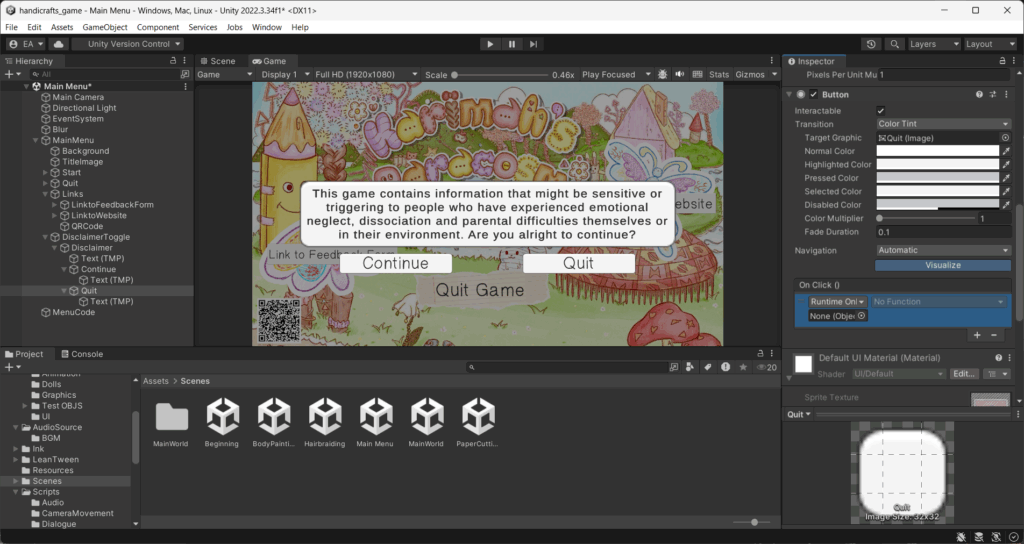
- I made a disclaimer screen for people who could potentially be triggered by the themes discussed in the game, as mentioned in my Subject Sensitivities post in the first semester.

- ^ I started laying out the sprites of the drawings that Hayley gave me. Makenah has 3 Expressions: Default (Happy), Sad and Surprised. She has each expression in 4 different hairstyles. So I spent a while sorting these out using Inkle tags and a Unity code to change the tags accordingly depending on which hairstyle you pick for her. You can see me using this below.

Week 8 (27/04/26 – 03/05/26)
I found a Unity asset that would help me immensely with the painting minigame. It is called “Free Draw”, and I used it as a basis for the painting game. Ines will ask you to paint a picture for her, and you can draw what you’d like using the prompts I’ve shuffled. I created a prompt shuffler code which players can use to inspire their drawings.

Link to the video of the asset: Free Draw – Simple Drawing on Sprites/2D Textures in Unity


- ^ I started modelling the pen object that the player will collect. At first, I was very inspired by 2000-10s girl-oriented stationery, which led me to Pompom pens, as many girls had them in this era. I used a hair system in Blender, then converted it into a curve, and from a curve to a mesh. The pompom you see above only has that texture from transparent planes, a technique used for low-poly game foliage and other textures, so I was somewhat familiar with it. I had to decimate it a lot as there were too many polys. It was going well until the texture wouldn’t show well in Unity, leading me to scrap the idea.


- I then decided on a “Glittery Wand” type of pen, as the pen is meant to be glittery anyway. Here you can see my development with the colours of the pen.
Week 9 (04/05/26 – 10/05/2026)

- I finally (finally!!) set up my Itch.io Page. It includes some basic gameplay screenshots and a custom theme that ties into the game’s craftiness!
5th Sprint Playtests
I had 3 Playtesters this sprint, one of which was the 22nd of April Playtest. Here are the results:
Person 1 (Classmate A)


Person 2 (Classmate B)


Person 3 (Visit day Playtester)


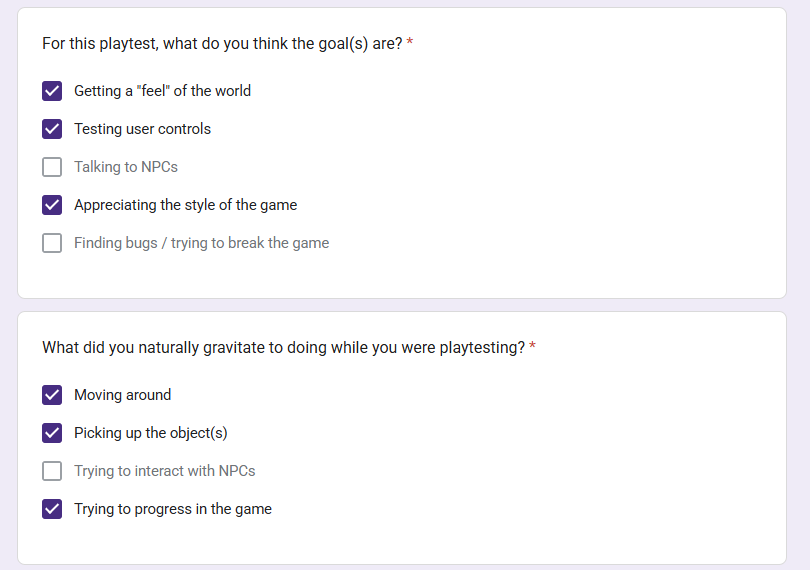


Conclusion of the playtest – Results Simplified
(Did I have this issue last playtest? = 🟠)
| What I noticed | What do they like? | What can I improve on? |
| – Confusion in the movement 🟠 – Trying to click on everything to see what would happen 🟠 – Flinging objects around to see if there was any dialogue with that | – The visuals – all 3 really liked the current visuals of the game and how it was presented. All intrigued by the “cutesy” aesthetic – The fact that you can play with the objects like in real life | – Similar to last sprint: * How to Play Pop-up at the beginning of the game * Object 3D modelling done * Adding the minigames (the playtester was mildly disappointed that they couldn’t play). |
Feedback from Jordan
Jordan also playtested my game this sprint. Below is some advice he gave me about the current state.
- Getting placeholder objects, as the game looks unfinished.
- Get the dialogue completed
- Fix dialogue code with E, as people can only interact with E while hovering inside
- Add sound at the beginning, like ambient music.
- Hide objects behind the layered part; this will make the world appear fuller.
- Be mindful of the time we have – what is reasonable to put into the game right now, and what can wait?
- Ending by calling back to the beginning, like a cutscene at the end as well.
Overall, he liked the game’s aesthetic and how it was coming together thus far.

Reflection of the Sprint
(Done = ✅) | (Preparing = 🟠) | (Not done = 🔴)
I definitely got a lot done in this sprint, and right now, I’m just trying to get as much done before the deadline. I’ve had a lot of setbacks these past few sprints, bugs, delays, etc., but now I have a definite list of what I need to do, and I am going through it bit by bit. I am certain I will have most aspects of the game done by 2 weeks! It is a little nerve-wracking, but it’s just about pushing through at this point!