This week we focused on audio and sound aspects of games.
Audio gives your settings context, guides players through the narrative and helps set the tone of the game in general. It is important to know how and where to focus on the audio and sound, and how to source/produce a high-quality audio for your game.
Functions of game audio
- anchoring – connecting the player to the world and keeping them there; immersion >>> believability; grounds in the reality of the world; sense of presence
- informing – audio communicates information about the game and setting to the player; feedback and reward; direct player focus; evoke mood emotion; accessibility
- branding/identity – sound and music that transcends the game itself; studio/product; game franchise identity; to be iconic
Categories of game audio
- sound: ambience; ui/ux; sfx; silence
- music: diegetic – exists within the game world (radio in the game); non-diegetic – outside the game world (soundtrack); custom; licensed
- speech: voiceover; dialogue; group chat
diegetic: car radio; weapons, spells; character dialogue
non-diegetic: menu sounds; underscore; narrator
IEZA models – four conceptual domains of communication:
Interface – menu, scrolling etc.
Effect – gunshots, attacks, swimming etc.
Zone – setting, ambience
Affect – not in the world, but contributing the setting the scene
Audio and non-linear media
Key concepts:
- interactive
player > game — trigger comes from the direct action of the player; footsteps; gunshots etc.
- reactive
player > … > game — trigger comes from the indirect action of the player; combat start/stop; reward sounds; enemy reactions.
- adaptive
game > game — trigger comes from conditions or states within the internal game system or environment; time remaining; low health; day/night cycle
- dynamic
sound > sound — real-time mixing of individual sound and music; ducking music for important dialogue; spatial positioning and distance; prioritising/culling audible sounds.
Thursday lecture was focused on HUD, UI and accessibility.
Non-diegetic UI
- ring menu — circular menu that allows the player to spin through recourses or actions
- life meter — meter that shows how much health the player’s avatar has remaining
- level map — small-scale map that show the entire layout of the level
Diegetic UI
- futuristic UI overlays — advanced UI, often inside of a helmet, that provides the player’s avatar with vital stats and information
- in-game gadgets — gadgets that hold important clues for the player’s avatar
- physical limitations — when the player’s avatar is physically hindered after sustaining damage
Spatial UI
- selection auras — coloured bracket that the player uses to select in-game objects
- racing lines — highlighted line that indicates the path for a vehicle to follow
- object text labels — text label that hovers near the in-game objects
Meta UI
- FOV colour filters — colour filter that overtakes player’s field of view and denotes a change in resources, health or scenario
- grime — materials like blood, dirt, and cracked glass that advance the story but only exist on a 2D plane
- scrolling text — spoken dialogue that scrolls horizontally across the screen
The task of this lecture was to create a UI for a game setting that we chose. In my team’s case it was a farming game.
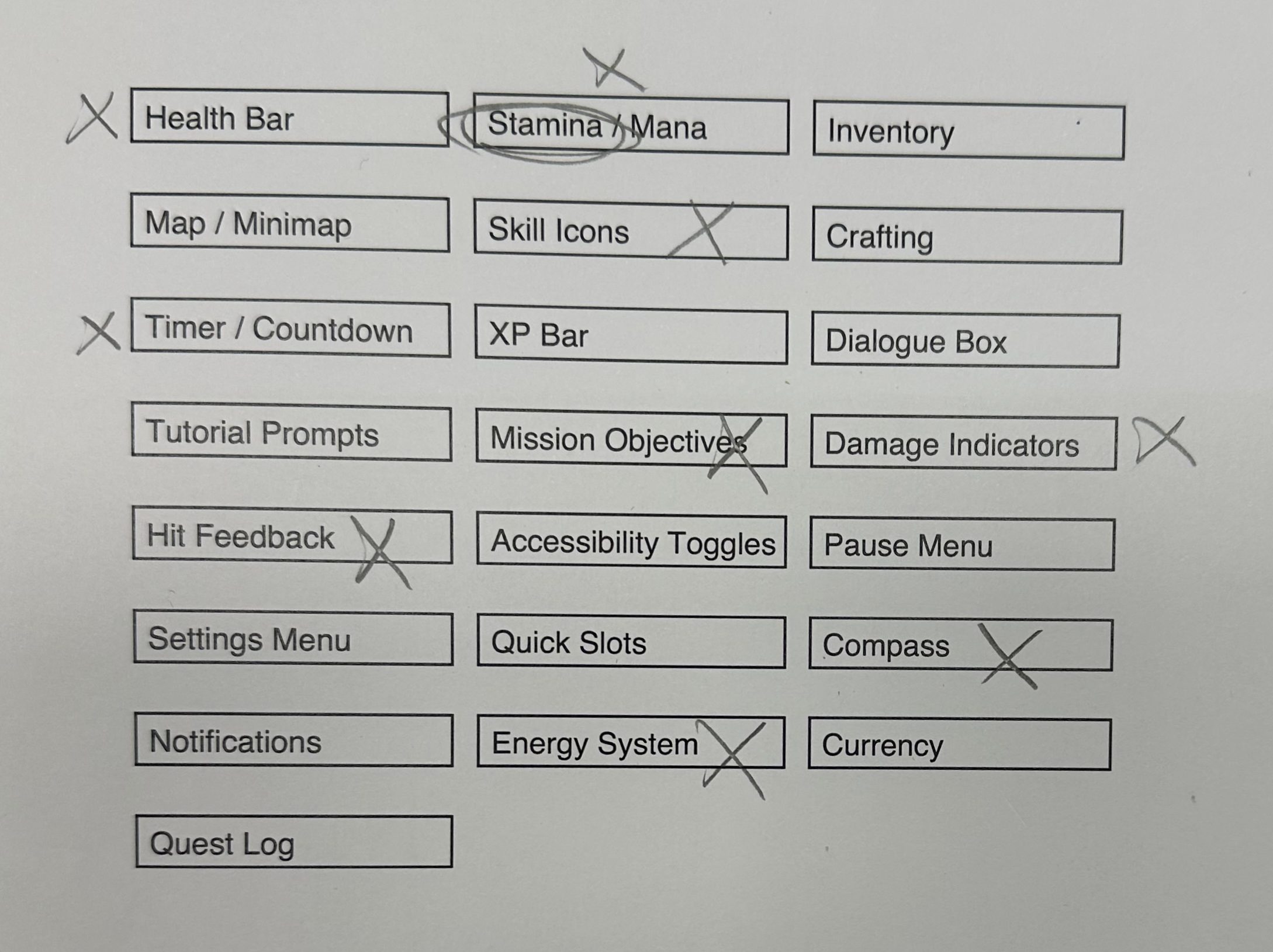
We were given a selection of UI elements that could be added to the screen. Reading through them we crossed out the ones that did not go/weren’t used in farming simulators. We left Stamina but ended up not using it, but I guess, in some contexts, it can be a part of the UI.
In my game, the elements would be: inventory/quick slots, “map” (more like location archive), dialogue box, tutorial prompts, mission objectives, accessibility toggles, pause menu w/ settings menu combined.
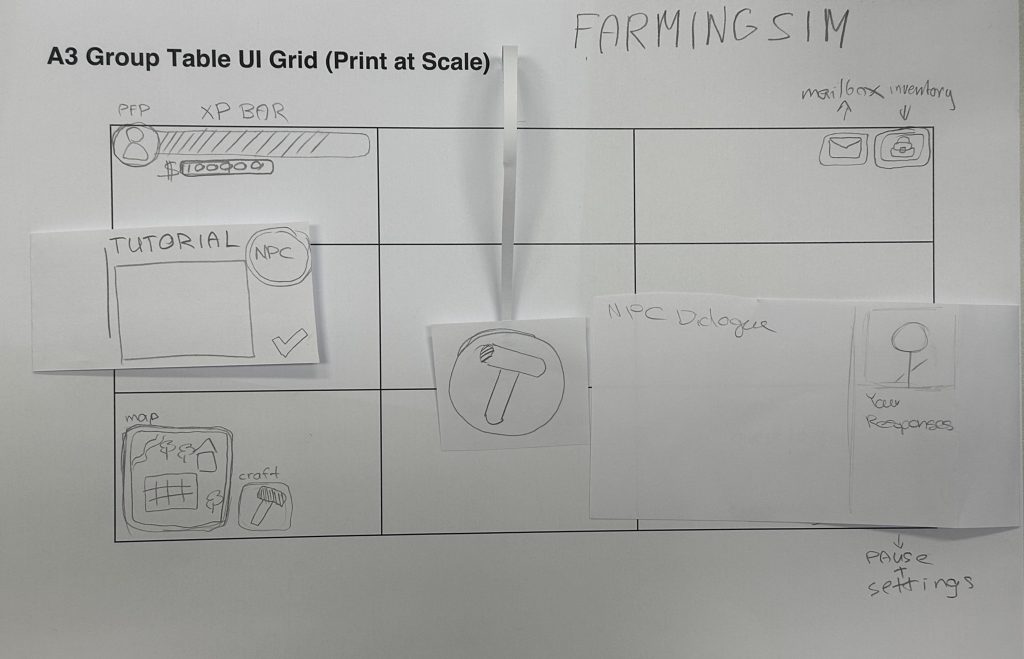
Farming simulator games are essentially focused on collecting resources, levelling up your farm and extending territories/discovering new resources etc. In our case, we combined UIs from different games and came up with something new. Games like HayDay or Township have non-diegetic UI for gathering grown plants off the yard — a hovering menu with farming tools that appears when you click on yard sections where the plants’ growing cycle finished.
Tutorials usually have the same concept in mind in any game — short, informative windows that pop up when the player discovers a new feature in the game. They’re usually narrated by a relevant NPC or are just a part of special UI.

We decided to make Quest Log look like an actual notebook/diary that can be interacted with.
I will have the same type of UI in my game, the main character’s notebook will serve as an Archive for all the animals you have encountered.
Decided to separate accessibility from settings as it’s supposed to be accessible and not being hidden away in the settings menu.
In my opinion, farming sims are that type of games that are supposed to have a lot of hovering UI that doesn’t take away space on the screen and can be easily accessed by only clicking on relevant objects.
Leave a Reply