How Sound Shapes Play
In games music subconsciously connect audience to the game world.
Functions of game audio
- Anchoring – Keep player connected to the game world
- Immersion >> believability
- Informing – audio communicates info about the game and setting to the player
- Feedback & reward. E.g. pressing a button again after pressing it should make a different sound to inform the player that it has been pressed
- Direct the player’s focus
- Evoke mood & emotion
- Accessibility. E.g. vibrating controller when you get too close to the road edge, like in Forza Motorsport
- Branding/identity
- Product/studio brand
- Game identity
- To be iconic
Categories of Game Audio
Sound
- Ambience
- UI/UX
- SFX
- Silence
Music
- Diegetic (within world)
- Non-diegetic (characters can’t hear it, we can)
- Custom
- Licenced
Speech
- Narrator, voice over (VO)
- Dialogue
- Group chat
Dramatic dissonance can be used to create contrast between what’s happening and the music. E.g. disastrous event + slow mellow sad music
Examples of what classifies as in or out of the world
Diegetic
- Car radio
- Weapons/spells
- Character dialogue
Non-diegetic
- Menu sounds
- Underscore
- Narrator
IEZA Model
4 conceptual domains of communication: interface, effect, zone, affect
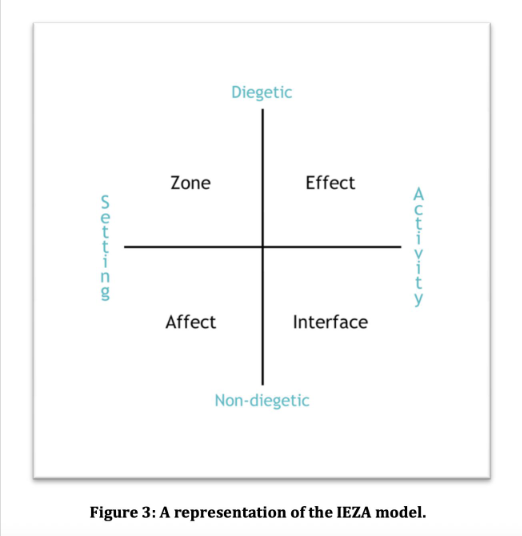
Figure 8 Huiberts & van Tol, 2008
Audio for non-linear media
- Interactive
- Player >>> Game
Press button > footsteps
- Reactive
- Player >…..> Game
Trigger comes from indirect action of the player.
E.g. whistle >…..> NPC makes a sound in response
- Adaptive
- Game >>> Game
Trigger comes from conditions of states within internal games systems
e.g. game clock, heartbeat when low health
In Luigi’s Mansion 3, a loud and distracting heartbeat sound plays when reaching low health throughout. This isn’t good as it distracted the player from the gameplay, and they have to listen to it the entire time they’re on low health. However, despite this being an example of bad use of Adaptive sound, I thought about whether a consistent annoying and distracting sound could work for my game, where the player has to fight through anxiety to remember their grocery list and finish their shopping. In my game, the circumstances of the character are the reason she struggles to remember her list, so it could work, however it could be a little too distracting considering all the distractions that there are already.
- Dynamic
- Sound >>> Sound
Real time mixing of individual sounds and music
E.g. spatial positioning and distance
Ducking music for important dialogue
Prioritising/culling audible sounds
Hear a missile coming at you from behind more than anything else
Audio direction framework
- Direction – what? Why?
e.g. recording from other games, like a sound moodboard
- Operation (style) – What programs, etc
- Tech – Who’s doing that?
At the end of the lesson I spoke with Dave about the possible sounds that could be in my game. I told him what my game was about, and he said I could make the sounds be louder or more overwhelming according to the anxiety and that the anxiety could rise up consistently as you spend time inside the store, meaning the sound would shift in a linear way. This was helpful and made me more confident that my concept idea was very clear, because I was considering something like that as well, for instance I was thinking that the sounds of the NPCs would become louder and any other sound would be overtaken.
Controllers, Audio & Embodied Play + catching up
Practical Checks for Your GDD
• Can every mechanic be remapped? (motor accessibility)
• Is essential info colour-independent? (colour-blind
modes)
• Is the mapping similar to other games and easy to
learn?
• Are UI fonts readable at small distances? (console &
handheld)
• Is difficulty tied to input pressure/timing?
(adjustable?)
• Do you provide alternative inputs? (tap vs hold, toggle
vs press)
What is game UI and what makes it?
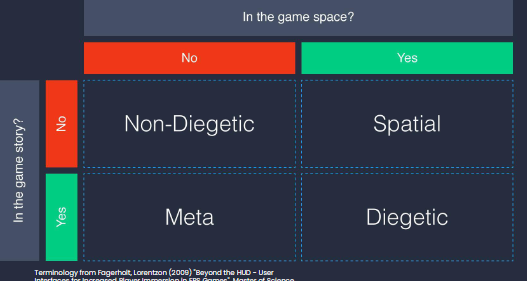
Firewatch mostly operates withing the Diegetic section. The map the player uses is within game world and the 3d game space.

Non-diegetic UI
- Ring menu – spin through resources or actions
- Life meter
- Level map – small map showing the entire layout of a level
Diegetic UI
- Futuristic UI overlays – e.g. built into the helmet the character wears, displaying vital stats and information
- In-game gadgets
- Physical limitations – character is physically hindered after sustaining damage
Spatial
- Selection Aura
- Racing lines – highlighted line that indicates the path to follow
- Object text labels
Meta
- FOV colour filters – indicates a change of state through full screen filters
- Grime – materials such as blood, dirt or broken glass, only exist in 2d plane
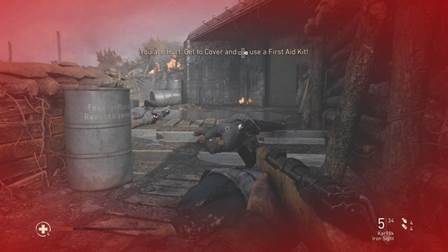
UI should change accordingly to the device it is on.
Workshop Activity: Player-Centric UI Layout Lab
• Goal: Create UI layouts informed by attention flow, hierarchy, and player needs.
• Each group will design the UI for a shared game scenario.
With my teammate we made a UI layout for an action RPG. We simply ended up putting most things at the corners and tried grouping together UI components we though worked together. We didn’t do a very good job, and we didn’t even realise we could draw the UI until we had to swap sheet with another team for feedback, we just assumed we had to stick them down for some reason and just figure out the locations.
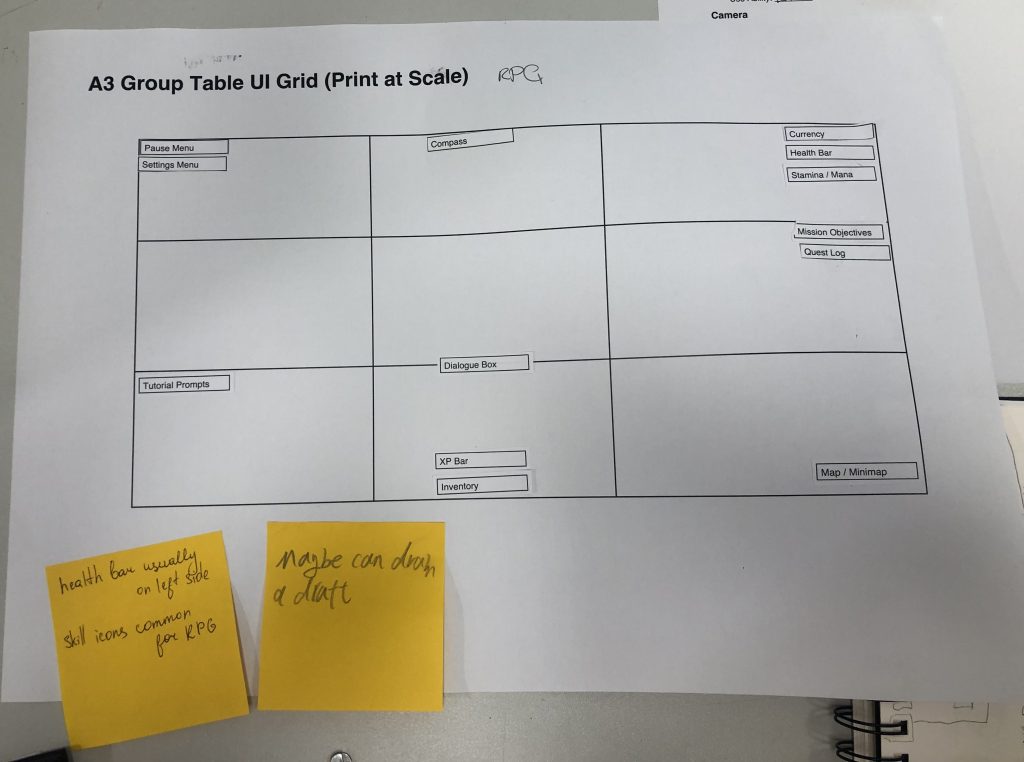
The feedback we were given by the other group said, “health bar usually on left side”, “skill icons common for RPG” (probably mentioned because we didn’t draw anything), and “maybe draw a draft”. We did not redo it, but I will keep in mind to draw out the UI.