
Control With PC
Movement and Viewpoint
- W/A/S/D – Move forward, backward, left, and right
- Mouse movement – Control viewpoint/look around
- Shift (hold) – Walk slowly/Focus mode (quieter movement, more precise viewpoint adjustments)
- Spacebar – Jump (if there are light platforming elements)/Confirm interaction
Tool Switching and Special Functions
- F1 key – Switch to magnifying glass tool
- F2 key – Switch to Radio Tool
- F3 key – Switch to Unarmed/Exploration Mode
- F4 key – Switch to Cutty View
- Q – Squat Down
- Tab key – Open Inventory
System Functions
- ESC key – Pause Menu/System Settings
- H – Hide/Show all interfaces (Screenshot mode)
- F (press and hold for 3 seconds) – Refresh the current puzzle to its original state (prevent to getting stuck)
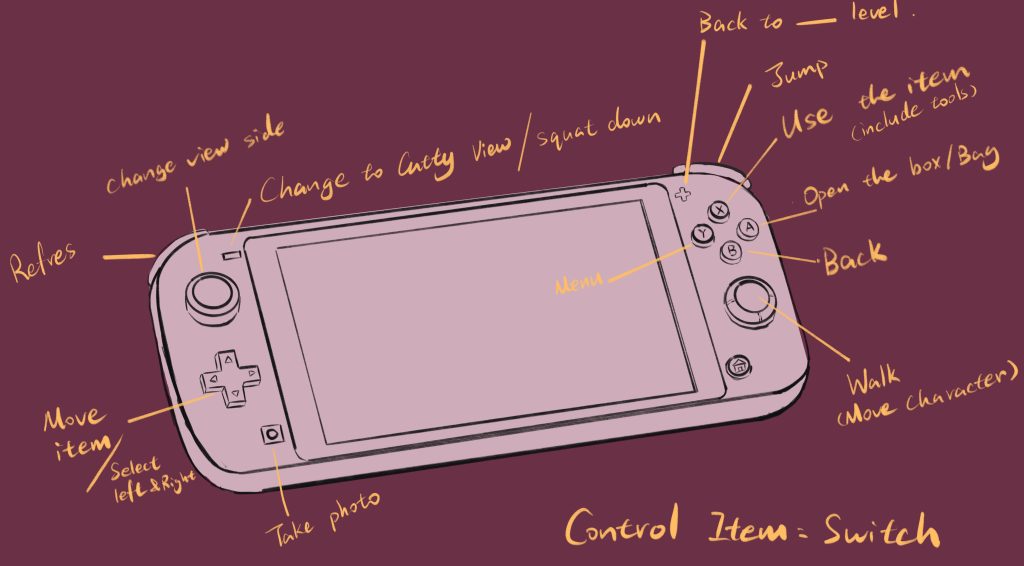
Control with Nintendo Switch:
More easier to control than PC, best way to play the game.