The video shows dialogue typewriter display:
Dialogue Typewriter Display:
StartTyping Blueprint:

My blueprint approach is as follows: first, create a function called StartTyping, and implement the ‘start typing’ operation within the function’s blueprint.
Next, create the variables: DialogueArray, DialogueIndex, FullText, CurrentIndex and TypingSpeed.
First, set the FullText variable by extracting the content from the DialogueArray variable and assigning it to FullText. Next, prepare the text by clearing the text box and resetting CurrentIndex to 0. Finally, start the timer, tick the ‘looping’ box, and set the value of the TypingSpeed variable. Then call the TypeNextCharacter function.
TypeNextCharacter Blueprint:

My plan is as follows: first, set up a condition. When the condition that `CurrentIndex` is less than the length of `FullText` is met, set the text. Increment the `CurrentIndex` by 1 within the text, so that one more character is displayed each time. If the conditions are not met, clear the timer and stop typing.
Dialogue Blueprint:
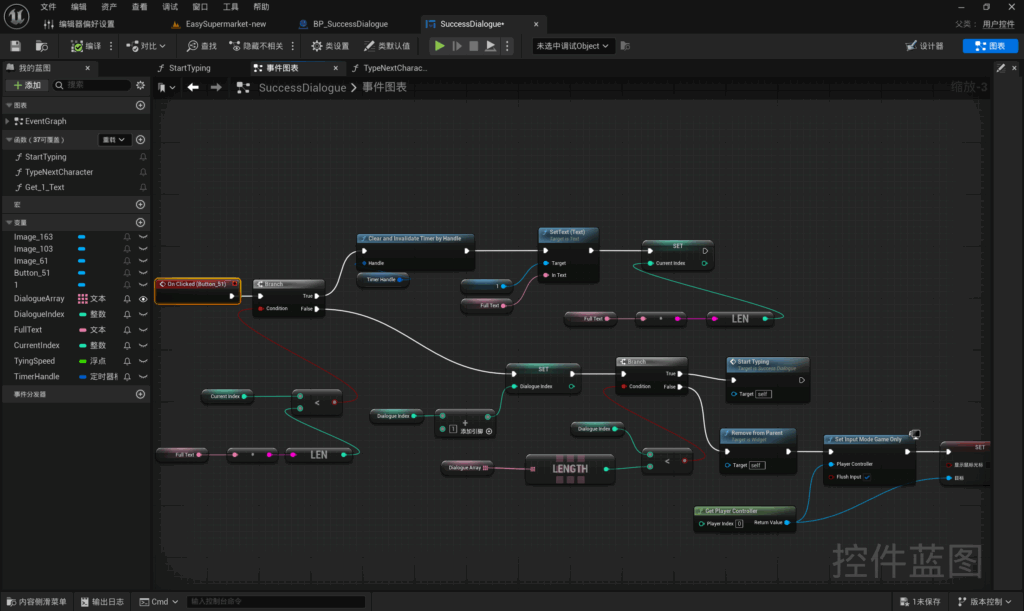
The Blueprint is triggered when the player clicks the button. My Blueprint approach is as follows: first, I set a condition where CurrentIndex is less than the length of FullText. If this condition is met, I clear the timer and set the text in textbox 1 to FullText. Finally, I set CurrentIndex to equal the length of FullText. This method skips the typing animation and displays the full text immediately.
If this condition is not met, increment the `DialogueIndex` by 1. Then set up a check to determine whether the `DialogueIndex` is less than the length of the `DialogueArray`. If this condition is met, call the `StartTyping` function. If this condition is not met, remove the user control and then unlock the player’s movement and restore the mouse cursor display.
BoxCollision Blueprint:
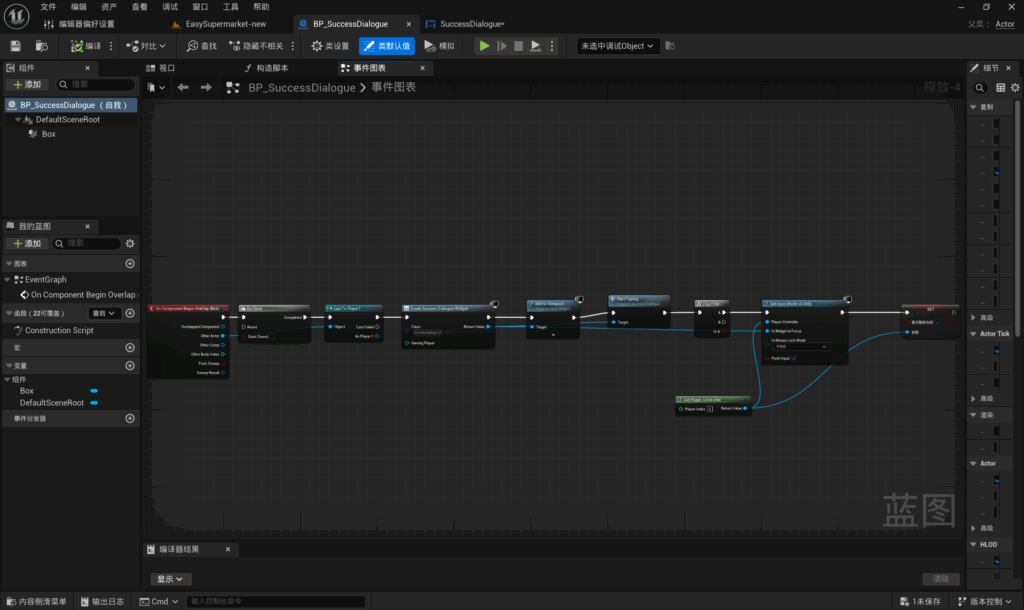
This is triggered when the player overlaps with the collision volume. My Blueprint approach is as follows: the Blueprint is triggered only once after the player overlaps with the collision volume. Create a widget and add it to the viewport. Once the player is detected, call the `StartTyping` function. Retrieve the player controller, lock the player’s movement, and display the mouse cursor.
Leave a Reply