The video shows Pickup system:
Pickup System:

Because at first I was grabbing items by holding down the E button, but after player feedback, I changed it to have the player hold down the left mouse button to grab the item.
So first I set up the event to be triggered using the left mouse button.
After I get the camera it’s using the camera to get the player’s position and start triggering the event when the player’s position is detected.Also use the camera to get worldrotation to ensure that the camera is looking forward.After that a floating point number is set, which is the recognisable distance to the item.
After that I created a branch to add physics handle to component to make sure the player can pick up items and move around.Get physics handle Creates a component that adds a rotational position.
Now the player can only execute it frame by frame after holding down the left mouse button, so add a bool variable. Set this variable to true.
Finally, add a branch to released to get the variable you just set, set a release component, and set this variable to false.
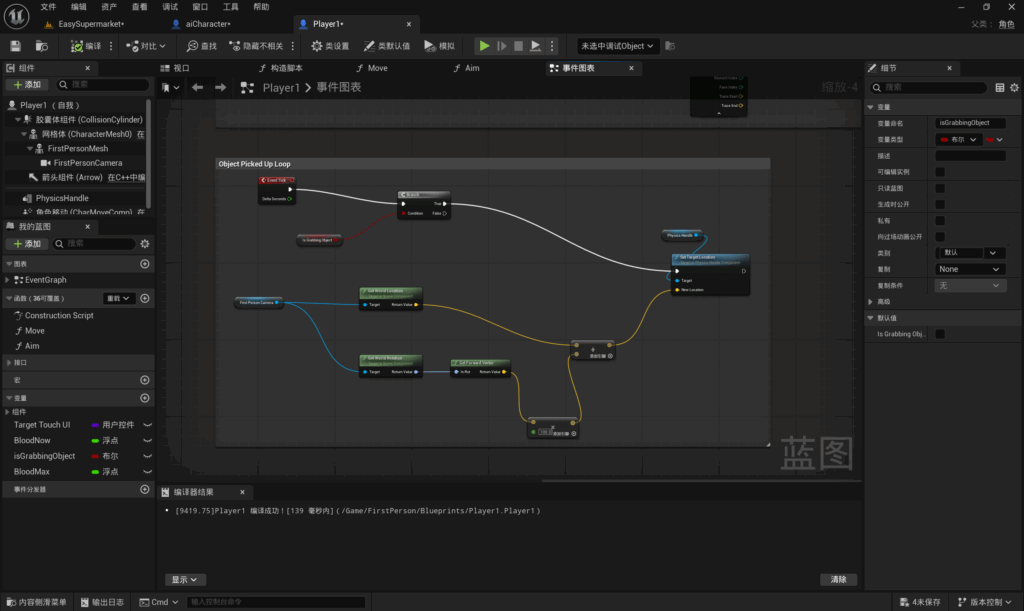
Set an Even Tick which will be called every frame. Create another branch that checks to see if the capture is being updated. check Set a Target Position that will fetch the new position.
Copy the camera position from the previous section of the blueprint and connect it to the new position.
Leave a Reply